Tag: computers

  • update for chastext on DOS

    I used my new getarg function I wrote to improve the DOS version of chastext. Nothing about the behavior of the program has changed but the code is a lot smaller and more readable. This chastext program was the original reason I wrote the chastearg program. I needed to get the command line arguments just write.

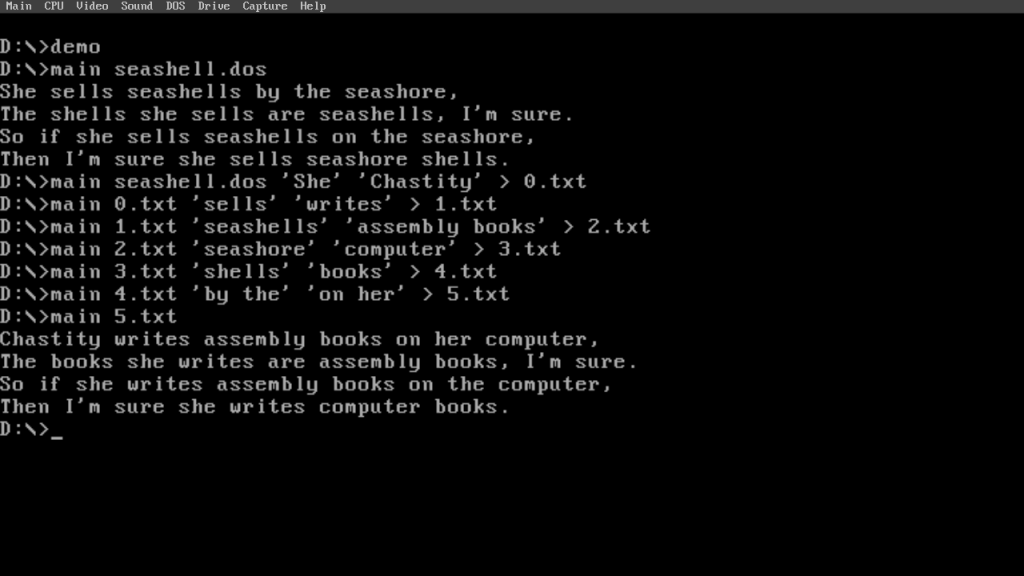
    But more importantly, people may not see the value of the chastext program and why it is useful to transform text. For that reason, I took this screenshot of a demo batch file that shows just how much I can modify a text file in stages.

    Besides changing a funny tongue twister about seashells into other things (which made a really great example), I also used the Linux version of chastext to make it possible to assemble my DOS programs with either FASM or NASM. The two assemblers are mostly compatible with each other when doing DOS programming due to the lack of headers in ‘.com’ files. Simply replacing “include” with “%include” is enough to transform my FASM source into NASM source because the % is required for the NASM include directive.

    FASM is my main assembler but making sure it assembles my code in NASM will also make a difference for those following my book, Assembly Arithmetic Algorithms for DOS. The book is complete and available on leanpub but there are possible corrections to the code if necessary.

    And for now, I am also trying to work on the Linux version of the book which will be more work because I have a new angle where I want to compare the Assembly to the C code of the same program. Since Linux developers are more familiar with C, it will help those with C language experience to learn the nature of Assembly language and how it is specifically very useful for Linux systems even more than it is for DOS or Windows.

    Also, the source code of the chastext program is available in its own repository.

    https://github.com/chastitywhiterose/chastext

    C and assembly versions are available which means that it can be either compiled or assembled and run on any operating system that I know about. Almost every platform has a C compiler and my custom assembly programs perform even higher on DOS and Linux than the C version did.

    Between chastehex, chastecmp, and now chastext, I have a small set of development tools that I can use for verifying when my programs are producing the output I want. Each tool was made for a specific need I had in mind.

  • chastarg for DOS

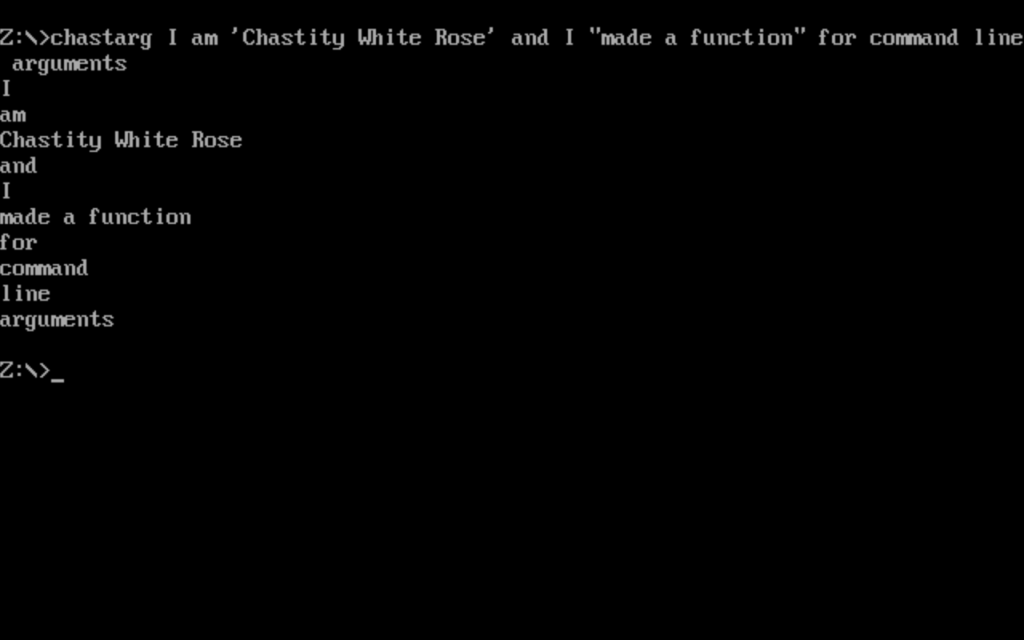
    The chastearg program, which is shortened to chastarg to respect DOS 8.3 filename limits, is a tool for separating command line arguments into multiple lines except preserving those that are quoted and therefore counting as one argument. Quoted strings will print on the same line.

    A key aspect of how this works is the new “getarg” function that I wrote. If you take a look at this small program that uses it, it is very simple.

    main.asm

    org 100h     ;DOS programs start at this address
    
    ;this loop will get all the command line arguments and print them on separate lines
    
    call getarg ;this first call will get the command string
    
    arg_loop:
    call getarg
    cmp ax,0 ;did the getarg function return 0?
    jz arg_loop_end ;if ax was zero, there are no args
    call putstring
    call putline
    jmp arg_loop
    arg_loop_end:
    
    ending:
    mov ax,4C00h ; Exit program
    int 21h
    
    include 'getarg.asm'
    include 'chastelib16.asm'
    
    db 0x48 dup 0 ;add extra bytes to make it 512 bytes exactly
    

    But the getarg function itself is a little bit complicated. I tried my best to comment it so that hopefully other DOS programmers can benefit from this useful function.

    getarg.asm

    ;The getarg function was something I badly needed in order to make my assembly code for DOS easier to read.
    ;It will automatically process the command line arguments if they are available.
    ;
    ;The first time it is run, it returns the whole command string or zero if no args are given
    ;DOS does not allow the program name to be part of the arguments
    ;
    ;Each time after that, it will give you the next argument which is a subtring of the original.
    ;When no more arguments are available, it will always return zero
    ;The program calling this is expected to check for this error and then terminate
    ;or print a message depending on the goals of that program
    
    ;A word of warning though, this function has multiple return statements and is long
    ;However, it is fully featured in that it can recognize quoted strings as being the same argument
    ;This brings full compatibility between my DOS and Linux programs which expect consistent behavior
    
    getarg:
    
    mov bx,[arguments_start] ;get the address of start of arguments
    cmp bx,0 ;is this address zero? (meaning this function was not called before)
    jz get_arg_data ;if it was zero, then get the argument data for the first execution of this function
    
    ;if the start was not zero, then clearly arguments exist and addresses have been saved
    cmp bx,[arguments_end]  ;is the address of the start and end the same?
    jnz find_next_string  ;if they are not the same, find the next sub string
    mov ax,0 ;otherwise, return ax as zero and check this in the main program
    
    ret
    
    find_next_string:
    
    mov bx,[arguments_start] ;get address of current arg
    
    skip_spaces:
    
    cmp byte[bx],' ' ;is this byte a space?
    jnz skip_spaces_end ;if it is not a space, we can end this loop
    inc bx ;otherwise, go to next byte
    jmp skip_spaces ;and keep looping till we find non-space
    skip_spaces_end:
    mov ax,bx ;copy this non-space address to ax register
    
    ;we have found a non-space which is the start of a printable string
    ;but we still have to find the next space and terminate it with a zero!
    
    ;however, there is a special case where we want a string to contain spaces. In this case, I have another routine!
    
    ;check for quoted strings
    cmp byte[bx],0x22 ;is this a double quote -> "
    jz scan_quoted_string
    cmp byte[bx],0x27 ;is this a single quote -> '
    jz scan_quoted_string
    
    find_space:
    cmp byte [bx],' ' ;is this a space?
    jz found_space ;if this was a space, end the loop and terminate with zero
    
    ;we must also check to see if we have reached the terminating zero of the arguments string
    cmp byte[bx],0 ;is this byte a zero?
    jz no_more_args ;if yes this string is already terminated
    
    inc bx
    jmp find_space ; this char was not space, go to the next char
    found_space:
    mov byte[bx],0 ;terminate this string
    
    inc bx ;but go to the next byte
    mov [arguments_start],bx ;and set the new start address for the next call
    
    ret ;We can return ax safely knowing the string ends in a zero
    
    scan_quoted_string:
    
    mov cl,byte[bx] ;mov this quote type to cl
    inc bx ;go to next byte
    mov ax,bx ;set ax to this address which is assumed to be the start of a quoted string
    
    find_end_quote:
    cmp byte[bx],cl ;is this the same quote we started with?
    jz found_end_quote ;if it is, end this loop
    
    ;we must also check to see if we have reached the terminating zero of the arguments string
    ;this avoids a crash if I forgot to add the second quotation mark in the arguments
    cmp byte[bx],0 ;is this byte a zero?
    jz no_more_args ;if yes this string is already terminated
    
    inc bx
    jmp find_end_quote
    found_end_quote:
    mov byte[bx],0 ;terminate this string
    
    inc bx ;but go to the next byte
    mov [arguments_start],bx ;and set the new start address for the next call
    
    ret
    
    no_more_args:
    
    mov [arguments_start],bx ;mov the start to where the string ended
    
    ;now that the start and end addresses are the same
    ;this function will always return zero
    ret
    
    ;this will happen first time this function is called to get the argument data
    get_arg_data:
    mov ax,0      ;zero ax (upper half of ax)
    mov al,[80h] ;load length of the command string from this address
    cmp ax,0
    jz getarg_end
    
    mov bx,0x81  ;mov into bx the address of the start of the argument string
    mov [arguments_start],bx ;save the start of the arguments to this variable
    add bx,ax    ;add the length of the command string to this address
    mov byte[bx],0 ;terminate this with a zero to avoid segfaults when printed with putstring
    mov [arguments_end],bx ;save the end of the arguments to this variable
    mov ax,[arguments_start] ;copy the address of the arguments start to ax
    
    getarg_end:
    ret
    
    ;start and end default to address of zero, which means we have not tested the arguments yet
    arguments_start dw 0
    arguments_end dw 0
    

  • Learning POSIX System Calls

    I have been doing Assembly language programming for some time now, and yet only today did I take the time to read the documentation and some online examples to help me learn how to use the system calls from C programs.

    On Linux systems like the Debian one I use, there are documentation pages already installed. There are hundreds of them, and yet only 6 are required to create all of my command-line tools.

    The following commands can be used to read each one of the 6 fundamental system calls available on Linux and Unix systems for C programmers.

    Six Supreme System Calls

    man 2 open
    man 2 close
    man 2 read
    man 2 write
    man 2 lseek
    man 2 exit
    

    My command line utilities, I have been creating such as chastehex, chastecmp, and chastext used these system calls in their assembly versions. However, I traditionally used the C standard library for the C versions of these programs.

    But after reading about the system calls and seeing some examples, I realized that I could make copies and rewrite these tools by calling only system calls. During this process, I learned how much easier they are to use compared to the C library functions.

    Here is a summary of each of these functions and how they are used in my programs.

    All of my tools use “open” to open a file and then “close” to close it when I am done with it. There can be no confusion as to what these functions do because of their names.

    Similarly, “read” and “write” do exactly what their names imply. They operate the same as fread and fwrite do in stdio. But they take only 3 arguments instead of 4, which makes a lot of sense. You give them a pointer, and then you tell them exactly how many bytes you want to read from or write to a file descriptor previously assigned with “open”.

    The “lseek” function stands for long seek and is capable of moving to a different position in a file before the next read or write operation. Not every program needs this, but chastehex does because one of the arguments is an address in hexadecimal to read or write. Jumping around in a file is sometimes necessary if you are working with large files or the address matters a lot.

    The final call to any program is “exit” because it ends the program. There isn’t much to say about it except that it also lets you return a number to the operating system. Usually, 0 means no errors happened, and a value of anything else indicates a specific type of error you have defined in your program. All of my programs return 1 if a file could not be opened.

    Each of these functions has various arguments that have clearly defined meanings. The return values are also specified in their manual pages.

    Interestingly, these calls are available on every operating system that I know about except for Windows. However, considering how easy these are to implement using the C standard library, it would be possible to write Windows versions of these. In fact, some people have already done this.

    See the Cygwin and MinGW projects for more information about how to use these calls on Windows. For all other operating systems: Linux, Unix (FreeBSD, OpenBSD, NetBSD, Minix, and ChromiumOS) These calls are already available if you have a working C compiler.

    You might wonder why I spent the time learning and explaining this. It is because having a super small library of functions that I can memorize allows faster programming and less time spent looking at my references when I have forgotten which order the arguments go in.

    This knowledge gives me an alternative library of functions I can use that is easier than the C standard library. However, I am keeping both versions of every program I have written.

    But the final point I want to make is that because these are the same calls used in my Assembly programs, I can make C programs that map 1 to 1 when comparing and teaching Assembly in the books I write!

  • new program: chastext

    I wrote another assembly program. This one works with text files instead of binary files. It can do a search and replace of all occurrences of a string in a text file. This could be useful for translating programs between programming languages or editing text configuration files. This screenshot is an example of how it can be used.

    main.asm

    ;Linux 32-bit Assembly Source for chastext
    ;a basic text search and replace program
    format ELF executable
    entry main
    
    ;a reduced form of chastelib without functions this program doesn't use
    include 'chastext-chastelib32.asm'
    
    main:
    
    ;radix will be 16 because this whole program is about hexadecimal
    ;mov dword [radix],16 ; can choose radix for integer input/output!
    
    pop eax
    mov [argc],eax ;save the argument count for later
    
    cmp [argc],1
    ja help_skip ;if more than 1 argument is given, skip the help message and process the other arguments
    
    help:
    mov eax,help_message
    call putstring
    jmp main_end
    help_skip:
    
    pop eax ;pop the next arg which is the name of the program we are running
    
    get_filename:
    pop eax ;pop the next arg which is the name of the file we will open
    
    mov [filename],eax ; save the name of the file we will open to read
    
    arg_open_file:
    
    ;Linux system call to open a file
    
    mov ecx,0   ;open file in read only mode
    mov ebx,eax ;filename should be in eax before this function was called
    mov eax,5   ;invoke SYS_OPEN (kernel opcode 5)
    int 80h     ;call the kernel
    
    cmp eax,0
    jns file_open_no_errors ;if eax is not negative/signed there was no error
    
    ;Otherwise, if it was signed, then this code will display an error message.
    
    mov eax,open_error_message
    call putstr_and_line
    
    jmp main_end ;end the program because we failed at opening the file
    
    file_open_no_errors:
    
    mov [filedesc],eax ; save the file descriptor number for later use
    
    ;before we just textdump or "cat" the file, we need to check for the existence of more arguments which will modify the output
    
    cmp [argc],3
    jb search_skip
    
    pop eax ;pop the next arg which is the string we are searching for
    mov [string_search],eax
    
    search_skip:
    
    cmp [argc],4
    jb replace_skip
    
    pop eax ;pop the next arg which is the string we are searching for
    mov [string_replace],eax
    
    replace_skip:
    
    ;now we begin displaying the file but also searching for the search string if it exists. We will check for these based on the number of arguments like we did earlier
    
    textdump:
    
    mov edx,1            ;number of bytes to read
    mov ecx,byte_array   ;address to store the bytes
    mov ebx,[filedesc]   ;move the opened file descriptor into EBX
    mov eax,3            ;invoke SYS_READ (kernel opcode 3)
    int 80h              ;call the kernel
    
    mov [bytes_read],eax
    
    cmp eax,0
    jnz file_success ;if more than zero bytes read, proceed to display
    
    jmp main_end
    
    ; this point is reached if file was read from successfully
    
    file_success:
    
    cmp [argc],2 ;if only 2 arguments, just putchar and read next one
    jnz putchar_skip
    
    ;normally, we will print the last read character
    mov al,[byte_array]
    call putchar
    
    putchar_skip:
    
    cmp [argc],3 ;if not enough arguments, skip the search string section
    jb textdump
    
    mov ebx,[string_search]
    
    mov al,[ebx]
    mov ah,[byte_array]
    cmp al,ah ;compare the first character of search string with the byte read already
    jz search_start ; if they are equal, skip putchar and begin searching for the string
    
    ;otherwise, if they are not equal, just putchar the last byte read and repeat the loop
    mov al,[byte_array]
    call putchar
    jmp textdump
    
    search_start:
    mov eax,[string_search]
    call strlen ;get the length of the search string
    
    ;attempt to read the length-1 bytes because the first one is already read into the byte array
    
    dec eax
    mov edx,eax            ;number of bytes to read
    mov ecx,byte_array+1   ;address to store the bytes
    mov ebx,[filedesc]     ;move the opened file descriptor into EBX
    mov eax,3              ;invoke SYS_READ (kernel opcode 3)
    int 80h                ;call the kernel
    
    mov ebx,ecx
    add ebx,eax
    mov byte [ebx],0 ;terminate the string with zero
    
    mov esi,[string_search]
    mov edi,byte_array
    call strcmp ;compare these two strings
    
    cmp eax,0 ;test if they are the same (if eax returned zero)
    jnz normal_print ;if they are not a match print them unmodified and unquoted
    
    ;but if they are a match, then we either quote them
    ;or replace them if a replacement string is available
    
    cmp [argc],4 ;if less than 4 args, no replacement exist, so we quote the strings
    jb print_quotes
    
    ;otherwise, we will print the replacement string instead of the original!
    
    mov eax,[string_replace]
    call putstring ;print the string
    
    jmp normal_print_skip
    
    print_quotes:
    ;print quotes around matched string
    mov al,'"'
    call putchar
    
    mov eax,byte_array
    call putstring ;print the string
    
    mov al,'"'
    call putchar
    
    jmp normal_print_skip
    
    normal_print: ;print normal / unquoted because it doesn't match
    
    mov eax,byte_array
    call putstring ;print the string
    
    normal_print_skip:
    
    jmp textdump
    
    main_end:
    
    ;this is the end of the program
    ;we close the open file and then use the exit call
    
    ;Linux system call to close a file
    
    mov ebx,[filedesc] ;file number to close
    mov eax,6          ;invoke SYS_CLOSE (kernel opcode 6)
    int 80h            ;call the kernel
    
    mov eax, 1  ; invoke SYS_EXIT (kernel opcode 1)
    mov ebx, 0  ; return 0 status on exit - 'No Errors'
    int 80h
    
    ;a function to get the length of string in eax and return the integer in eax
    
    strlen:
    
    mov ebx,eax ; copy eax to ebx. ebx will be used as index to the string
    
    strlen_start: ; this loop finds the length of the string as part of the putstring function
    
    cmp [ebx],byte 0 ; compare byte at address ebx with 0
    jz strlen_end ; if comparison was zero, jump to loop end because we have found the length
    inc ebx
    jmp strlen_start
    
    strlen_end:
    sub ebx,eax ;subtract start pointer from current pointer to get length of string
    
    mov eax,ebx ;copy the string length back to eax
    
    ret
    
    ;compare the string at esi to the one at edi
    
    strcmp:
    
    mov eax,0 ;this will be stay zero unless the strings are different
    
    strcmp_start:
    mov bl,[edi]
    cmp bl,0
    jz strcmp_end
    mov bh,[esi]
    cmp bh,0
    jz strcmp_end
    
    inc edi
    inc esi
    
    cmp bl,bh
    jz strcmp_start ;if they are the same, continue to next character
    
    inc eax ;if they were different, eax will be incremented and the function ends
    
    strcmp_end:
    ret
    
    help_message db 'chastext by Chastity White Rose',0Ah,0Ah
    db '"cat" a file:',0Ah,0Ah,9,'chastext file',0Ah,0Ah
    db 'search for a string:',0Ah,0Ah,9,'chastext file search',0Ah,0Ah
    db 'replace string:',0Ah,0Ah,9,'chastext file search replace',0Ah,0Ah
    db 'Find or replace any string!',0Ah,0
    
    open_error_message db 'error while opening file',0
    
    ;variables for managing arguments and files
    argc rd 1
    filename rd 1 ; name of the file to be opened
    filedesc rd 1 ; file descriptor
    bytes_read rd 1
    
    string_search rd 1 ; place to hold the search string pointer
    string_replace rd 1 ; place to hold the replacement string pointer
    
    ;where we will store data from the file
    byte_array rb 0x100
    

    chastext-chastelib32.asm

    ; chastelib assembly header file for 32 bit Linux
    
    ;This file has been modified for the chastext program
    ;Only string related functions are included because this program transforms text but does not process integers
    
    putstring:
    
    push eax
    push ebx
    push ecx
    push edx
    
    mov ebx,eax ; copy eax to ebx. ebx will be used as index to the string
    
    putstring_strlen_start: ; this loop finds the length of the string as part of the putstring function
    
    cmp [ebx],byte 0 ; compare byte at address ebx with 0
    jz putstring_strlen_end ; if comparison was zero, jump to loop end because we have found the length
    inc ebx
    jmp putstring_strlen_start
    
    putstring_strlen_end:
    sub ebx,eax ;subtract start pointer from current pointer to get length of string
    
    ;Write string using Linux Write system call.
    ;Reference for 32 bit x86 syscalls is below.
    ;https://www.chromium.org/chromium-os/developer-library/reference/linux-constants/syscalls/#x86-32-bit
    
    mov edx,ebx      ;number of bytes to write
    mov ecx,eax      ;pointer/address of string to write
    mov ebx,1        ;write to the STDOUT file
    mov eax,4        ;invoke SYS_WRITE (kernel opcode 4 on 32 bit systems)
    int 80h          ;system call to write the message
    
    pop edx
    pop ecx
    pop ebx
    pop eax
    
    ret ; this is the end of the putstring function return to calling location
    
    ;The utility functions below simply print a space or a newline.
    ;these help me save code when printing lots of strings and integers.
    
    line db 0Ah,0
    
    putline:
    push eax
    mov eax,line
    call putstring
    pop eax
    ret
    
    ;a function for printing a single character that is the value of al
    
    char: db 0,0
    
    putchar:
    push eax
    mov [char],al
    mov eax,char
    call putstring
    pop eax
    ret
    
    ;a small function just for the common operation
    ;printing a string followed by a line feed
    ;this saves a few bytes in the assembled code
    ;by reducing the number of function calls in the main program
    ;it also means we don't need to include a newline in every string!
    
    putstr_and_line:
    call putstring
    call putline
    ret
    
    
  • chastehex 1280 byte edition for Linux

    The following source code is a major update to chastehex for 32-bit Assembly source code for Linux. The behavior of the program hasn’t changed. It is still the great command line hex editor. However, the executable is a lot smaller than it previously was. I found some optimizations to reduce function calls and also removed some of the text while still having the messages say the same basic idea. This may not mean much to the average person but this is the best hand written assembly I have ever achieved and I made some extensions to chastelib that will be helpful for future programs.

    main.asm

    ;Linux 32-bit Assembly Source for chastehex
    ;a special tool originally written in C
    format ELF executable
    entry main
    
    start:
    
    include 'chastelib32.asm'
    
    main:
    
    ;radix will be 16 because this whole program is about hexadecimal
    mov dword [radix],16 ; can choose radix for integer input/output!
    
    pop eax
    mov [argc],eax ;save the argument count for later
    
    ;first arg is the name of the program. we skip past it
    pop eax
    dec dword [argc]
    
    ;before we try to get the first argument as a filename, we must check if it exists
    cmp dword [argc],0
    jnz arg_open_file
    
    help:
    mov eax,help_message
    call putstring
    jmp main_end
    
    arg_open_file:
    
    pop eax
    dec dword [argc]
    mov [filename],eax ; save the name of the file we will open to read
    call putstr_and_line
    
    ;Linux system call to open a file
    
    mov ecx,2   ;open file in read and write mode 
    mov ebx,eax ;filename should be in eax before this function was called
    mov eax,5   ;invoke SYS_OPEN (kernel opcode 5)
    int 80h     ;call the kernel
    
    cmp eax,0
    jns file_open_no_errors ;if eax is not negative/signed there was no error
    
    ;Otherwise, if it was signed, then this code will display an error message.
    
    neg eax
    call putint_and_space
    mov eax,open_error_message
    call putstr_and_line
    
    jmp main_end ;end the program because we failed at opening the file
    
    file_open_no_errors:
    
    mov [filedesc],eax ; save the file descriptor number for later use
    mov dword [file_offset],0 ;assume the offset is 0,beginning of file
    
    ;check next arg
    cmp dword [argc],0 ;if there are no more args after filename, just hexdump it
    jnz next_arg_address ;but if there are more, jump to the next argument to process it as address
    
    hexdump:
    
    mov edx,0x10         ;number of bytes to read
    mov ecx,byte_array   ;address to store the bytes
    mov ebx,[filedesc]   ;move the opened file descriptor into EBX
    mov eax,3            ;invoke SYS_READ (kernel opcode 3)
    int 80h              ;call the kernel
    
    mov [bytes_read],eax
    
    cmp eax,0
    jnz file_success ;if more than zero bytes read, proceed to display
    
    ;display EOF to indicate we have reached the end of file
    
    mov eax,end_of_file_string
    call putstr_and_line
    
    jmp main_end
    
    ; this point is reached if file was read from successfully
    
    file_success:
    
    call print_bytes_row
    
    cmp dword [bytes_read],1 
    jl main_end ;if less than one bytes read, there is an error
    jmp hexdump
    
    ;address argument section
    next_arg_address:
    
    ;if there is at least one more arg
    pop eax ;pop the argument into eax and process it as a hex number
    dec dword [argc]
    call strint
    
    ;use the hex number as an address to seek to in the file
    mov edx,0          ;whence argument (SEEK_SET)
    mov ecx,eax        ;move the file cursor to this address
    mov ebx,[filedesc] ;move the opened file descriptor into EBX
    mov eax,19         ;invoke SYS_LSEEK (kernel opcode 19)
    int 80h            ;call the kernel
    
    mov [file_offset],eax ;move the new offset
    
    ;check the number of args still remaining
    cmp dword [argc],0
    jnz next_arg_write ; if there are still arguments, skip this read section and enter writing mode
    
    read_one_byte:
    mov edx,1          ;number of bytes to read
    mov ecx,byte_array ;address to store the bytes
    mov ebx,[filedesc] ;move the opened file descriptor into EBX
    mov eax,3          ;invoke SYS_READ (kernel opcode 3)
    int 80h            ;call the kernel
    
    ;eax will have the number of bytes read after system call
    cmp eax,1
    jz print_byte_read ;if exactly 1 byte was read, proceed to print info
    
    call show_eof
    
    jmp main_end ;go to end of program
    
    ;print the address and the byte at that address
    print_byte_read:
    call print_byte_info
    
    ;this section interprets the rest of the args as bytes to write
    next_arg_write:
    cmp dword [argc],0
    jz main_end
    
    pop eax
    dec dword [argc]
    call strint ;try to convert string to a hex number
    
    ;write that number as a byte value to the file
    
    mov [byte_array],al
    
    mov eax,4          ;invoke SYS_WRITE (kernel opcode 4 on 32 bit systems)
    mov ebx,[filedesc] ;write to the file (not STDOUT)
    mov ecx,byte_array ;pointer to temporary byte address
    mov edx,1          ;write 1 byte
    int 80h            ;system call to write the message
    
    call print_byte_info
    inc dword [file_offset]
    
    jmp next_arg_write
    
    main_end:
    
    ;this is the end of the program
    ;we close the open file and then use the exit call
    
    ;Linux system call to close a file
    
    mov ebx,[filedesc] ;file number to close
    mov eax,6          ;invoke SYS_CLOSE (kernel opcode 6)
    int 80h            ;call the kernel
    
    mov eax, 1  ; invoke SYS_EXIT (kernel opcode 1)
    mov ebx, 0  ; return 0 status on exit - 'No Errors'
    int 80h
    
    
    ;this function prints a row of hex bytes
    ;each row is 16 bytes
    print_bytes_row:
    mov eax,[file_offset]
    mov dword [int_width],8
    call putint_and_space
    
    mov ebx,byte_array
    mov ecx,[bytes_read]
    add [file_offset],ecx
    next_byte:
    mov eax,0
    mov al,[ebx]
    mov dword [int_width],2
    call putint_and_space
    
    inc ebx
    dec ecx
    cmp ecx,0
    jnz next_byte
    
    mov ecx,[bytes_read]
    pad_spaces:
    cmp ecx,0x10
    jz pad_spaces_end
    mov eax,space_three
    call putstring
    inc ecx
    jmp pad_spaces
    pad_spaces_end:
    
    ;optionally, print chars after hex bytes
    call print_bytes_row_text
    call putline
    
    ret
    
    space_three db '   ',0
    
    print_bytes_row_text:
    mov ebx,byte_array
    mov ecx,[bytes_read]
    next_char:
    mov eax,0
    mov al,[ebx]
    
    ;if char is below '0' or above '9', it is outside the range of these and is not a digit
    cmp al,0x20
    jb not_printable
    cmp al,0x7E
    ja not_printable
    
    printable:
    ;if char is in printable range,keep as is and proceed to next index
    jmp next_index
    
    not_printable:
    mov al,'.' ;otherwise replace with placeholder value
    
    next_index:
    mov [ebx],al
    inc ebx
    dec ecx
    cmp ecx,0
    jnz next_char
    mov [ebx],byte 0 ;make sure string is zero terminated
    
    mov eax,byte_array
    call putstring
    
    ret
    
    
    ;function to display EOF with address
    show_eof:
    
    mov eax,[file_offset]
    mov dword [int_width],8
    call putint_and_space
    mov eax,end_of_file_string
    call putstr_and_line
    
    ret
    
    ;print the address and the byte at that address
    print_byte_info:
    mov eax,[file_offset]
    mov dword [int_width],8
    call putint_and_space
    mov eax,0
    mov al,[byte_array]
    mov dword [int_width],2
    call putint_and_line
    
    ret
    
    end_of_file_string db 'EOF',0
    
    help_message db 'chastehex by Chastity White Rose',0Ah,0Ah
    db 'hexdump a file:',0Ah,0Ah,9,'chastehex file',0Ah,0Ah
    db 'read a byte:',0Ah,0Ah,9,'chastehex file address',0Ah,0Ah
    db 'write a byte:',0Ah,0Ah,9,'chastehex file address value',0Ah,0Ah
    db 'The file must exist',0Ah,0
    
    ;variables for managing arguments and files
    argc dd 0
    filename dd 0 ; name of the file to be opened
    filedesc dd 0 ; file descriptor
    bytes_read dd 0
    file_offset dd 0
    open_error_message db 'error while opening file',0
    
    ;where we will store data from the file
    byte_array db 17 dup '?'
    

    chastelib32.asm

    ; chastelib assembly header file for 32 bit Linux
    ; This file is where I keep the source of my most important Assembly functions
    ; These are my string and integer output and conversion routines.
    
    ; To simplify documentation. The Accumulator/Arithmetic register
    ; (ax,ebx,rax) depending on bit size shall be referred to as register A
    ; for the description of these core functions because the A register
    ; is treated special both by the Intel company and my code;
    
    ; putstring; Prints a zero terminated string from the address pointer to by A register.
    ; intstr;    Converts the number in A into a zero terminated string and points A to that address
    ; putint;    Prints the integer in A by calling intstr and then putstring.
    ; strint;    Converts the zero terminated string into an integer and sets A to that value
       
    ; Now, the source of the functions begins, with comments included for parts that I felt needed explanation.
    
    stdout dd 1 ; variable for standard output so that it can theoretically be redirected
    
    putstring:
    
    push eax
    push ebx
    push ecx
    push edx
    
    mov ebx,eax ; copy eax to ebx. ebx will be used as index to the string
    
    putstring_strlen_start: ; this loop finds the length of the string as part of the putstring function
    
    cmp [ebx],byte 0 ; compare byte at address ebx with 0
    jz putstring_strlen_end ; if comparison was zero, jump to loop end because we have found the length
    inc ebx
    jmp putstring_strlen_start
    
    putstring_strlen_end:
    sub ebx,eax ;subtract start pointer from current pointer to get length of string
    
    ;Write string using Linux Write system call.
    ;Reference for 32 bit x86 syscalls is below.
    ;https://www.chromium.org/chromium-os/developer-library/reference/linux-constants/syscalls/#x86-32-bit
    
    mov edx,ebx      ;number of bytes to write
    mov ecx,eax      ;pointer/address of string to write
    mov ebx,[stdout] ;write to the STDOUT file
    mov eax, 4       ;invoke SYS_WRITE (kernel opcode 4 on 32 bit systems)
    int 80h          ;system call to write the message
    
    pop edx
    pop ecx
    pop ebx
    pop eax
    
    ret ; this is the end of the putstring function return to calling location
    
    ; This is the location in memory where digits are written to by the intstr function
    ; The string of bytes and settings such as the radix and width are global variables defined below.
    
    int_string db 32 dup '?' ;enough bytes to hold maximum size 32-bit binary integer
    
    int_string_end db 0 ;zero byte terminator for the integer string
    
    radix dd 2 ;radix or base for integer output. 2=binary, 8=octal, 10=decimal, 16=hexadecimal
    int_width dd 8
    
    ;this function creates a string of the integer in eax
    ;it uses the above radix variable to determine base from 2 to 36
    ;it then loads eax with the address of the string
    ;this means that it can be used with the putstring function
    
    intstr:
    
    mov ebx,int_string_end-1 ;find address of lowest digit(just before the newline 0Ah)
    mov ecx,1
    
    digits_start:
    
    mov edx,0;
    div dword [radix]
    cmp edx,10
    jb decimal_digit
    jae hexadecimal_digit
    
    decimal_digit: ;we go here if it is only a digit 0 to 9
    add edx,'0'
    jmp save_digit
    
    hexadecimal_digit:
    sub edx,10
    add edx,'A'
    
    save_digit:
    
    mov [ebx],dl
    cmp eax,0
    jz intstr_end
    dec ebx
    inc ecx
    jmp digits_start
    
    intstr_end:
    
    prefix_zeros:
    cmp ecx,[int_width]
    jnb end_zeros
    dec ebx
    mov [ebx],byte '0'
    inc ecx
    jmp prefix_zeros
    end_zeros:
    
    mov eax,ebx ; now that the digits have been written to the string, display it!
    
    ret
    
    ; function to print string form of whatever integer is in eax
    ; The radix determines which number base the string form takes.
    ; Anything from 2 to 36 is a valid radix
    ; in practice though, only bases 2,8,10,and 16 will make sense to other programmers
    ; this function does not process anything by itself but calls the combination of my other
    ; functions in the order I intended them to be used.
    
    putint: 
    
    push eax
    push ebx
    push ecx
    push edx
    
    call intstr
    
    call putstring
    
    pop edx
    pop ecx
    pop ebx
    pop eax
    
    ret
    
    ;this function converts a string pointed to by eax into an integer returned in eax instead
    ;it is a little complicated because it has to account for whether the character in
    ;a string is a decimal digit 0 to 9, or an alphabet character for bases higher than ten
    ;it also checks for both uppercase and lowercase letters for bases 11 to 36
    ;finally, it checks if that letter makes sense for the base.
    ;For example, G to Z cannot be used in hexadecimal, only A to F can
    ;The purpose of writing this function was to be able to accept user input as integers
    
    strint:
    
    mov ebx,eax ;copy string address from eax to ebx because eax will be replaced soon!
    mov eax,0
    
    read_strint:
    mov ecx,0 ; zero ecx so only lower 8 bits are used
    mov cl,[ebx]
    inc ebx
    cmp cl,0 ; compare byte at address edx with 0
    jz strint_end ; if comparison was zero, this is the end of string
    
    ;if char is below '0' or above '9', it is outside the range of these and is not a digit
    cmp cl,'0'
    jb not_digit
    cmp cl,'9'
    ja not_digit
    
    ;but if it is a digit, then correct and process the character
    is_digit:
    sub cl,'0'
    jmp process_char
    
    not_digit:
    ;it isn't a digit, but it could an alphabet character which is a digit in a higher base
    
    ;if char is below 'A' or above 'Z', it is outside the range of these and is not capital letter
    cmp cl,'A'
    jb not_upper
    cmp cl,'Z'
    ja not_upper
    
    is_upper:
    sub cl,'A'
    add cl,10
    jmp process_char
    
    not_upper:
    
    ;if char is below 'a' or above 'z', it is outside the range of these and is not lowercase letter
    cmp cl,'a'
    jb not_lower
    cmp cl,'z'
    ja not_lower
    
    is_lower:
    sub cl,'a'
    add cl,10
    jmp process_char
    
    not_lower:
    
    ;if we have reached this point, result invalid and end function
    jmp strint_end
    
    process_char:
    
    cmp ecx,[radix] ;compare char with radix
    jae strint_end ;if this value is above or equal to radix, it is too high despite being a valid digit/alpha
    
    mov edx,0 ;zero edx because it is used in mul sometimes
    mul  dword [radix] ;mul eax with radix
    add eax,ecx
    
    jmp read_strint ;jump back and continue the loop if nothing has exited it
    
    strint_end:
    
    ret
    
    ;The utility functions below simply print a space or a newline.
    ;these help me save code when printing lots of strings and integers.
    
    space db ' ',0
    line db 0Dh,0Ah,0
    
    putspace:
    push eax
    mov eax,space
    call putstring
    pop eax
    ret
    
    putline:
    push eax
    mov eax,line
    call putstring
    pop eax
    ret
    
    ;a function for printing a single character that is the value of al
    
    char: db 0,0
    
    putchar:
    push eax
    mov [char],al
    mov eax,char
    call putstring
    pop eax
    ret
    
    ;a small function just for the common operation
    ;printing an integer followed by a space
    ;this saves a few bytes in the assembled code
    ;by reducing the number of function calls in the main program
    
    putint_and_space:
    call putint
    call putspace
    ret
    
    ;a small function just for the common operation
    ;printing an integer followed by a line feed
    ;this saves a few bytes in the assembled code
    ;by reducing the number of function calls in the main program
    
    putint_and_line:
    call putint
    call putline
    ret
    
    ;a small function just for the common operation
    ;printing a string followed by a line feed
    ;this saves a few bytes in the assembled code
    ;by reducing the number of function calls in the main program
    ;it also means we don't need to include a newline in every string!
    
    putstr_and_line:
    call putstring
    call putline
    ret