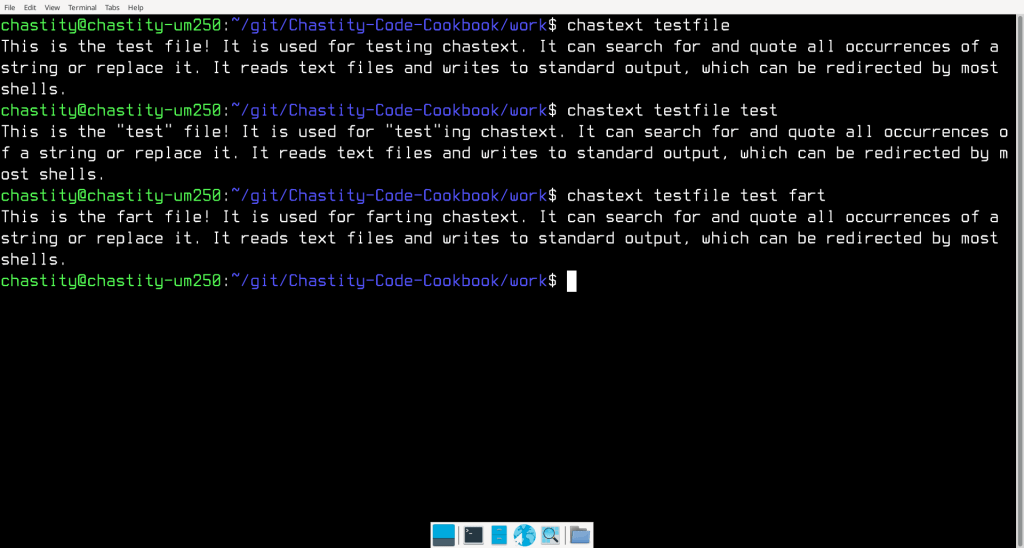
I wrote another assembly program. This one works with text files instead of binary files. It can do a search and replace of all occurrences of a string in a text file. This could be useful for translating programs between programming languages or editing text configuration files. This screenshot is an example of how it can be used.
main.asm
;Linux 32-bit Assembly Source for chastext
;a basic text search and replace program
format ELF executable
entry main

;a reduced form of chastelib without functions this program doesn't use
include 'chastext-chastelib32.asm'

main:

;radix will be 16 because this whole program is about hexadecimal
;mov dword [radix],16 ; can choose radix for integer input/output!

pop eax
mov [argc],eax ;save the argument count for later

cmp [argc],1
ja help_skip ;if more than 1 argument is given, skip the help message and process the other arguments

help:
mov eax,help_message
call putstring
jmp main_end
help_skip:

pop eax ;pop the next arg which is the name of the program we are running

get_filename:
pop eax ;pop the next arg which is the name of the file we will open

mov [filename],eax ; save the name of the file we will open to read

arg_open_file:

;Linux system call to open a file

mov ecx,0   ;open file in read only mode
mov ebx,eax ;filename should be in eax before this function was called
mov eax,5   ;invoke SYS_OPEN (kernel opcode 5)
int 80h     ;call the kernel

cmp eax,0
jns file_open_no_errors ;if eax is not negative/signed there was no error

;Otherwise, if it was signed, then this code will display an error message.

mov eax,open_error_message
call putstr_and_line

jmp main_end ;end the program because we failed at opening the file

file_open_no_errors:

mov [filedesc],eax ; save the file descriptor number for later use

;before we just textdump or "cat" the file, we need to check for the existence of more arguments which will modify the output

cmp [argc],3
jb search_skip

pop eax ;pop the next arg which is the string we are searching for
mov [string_search],eax

search_skip:

cmp [argc],4
jb replace_skip

pop eax ;pop the next arg which is the string we are searching for
mov [string_replace],eax

replace_skip:

;now we begin displaying the file but also searching for the search string if it exists. We will check for these based on the number of arguments like we did earlier

textdump:

mov edx,1            ;number of bytes to read
mov ecx,byte_array   ;address to store the bytes
mov ebx,[filedesc]   ;move the opened file descriptor into EBX
mov eax,3            ;invoke SYS_READ (kernel opcode 3)
int 80h              ;call the kernel

mov [bytes_read],eax

cmp eax,0
jnz file_success ;if more than zero bytes read, proceed to display

jmp main_end

; this point is reached if file was read from successfully

file_success:

cmp [argc],2 ;if only 2 arguments, just putchar and read next one
jnz putchar_skip

;normally, we will print the last read character
mov al,[byte_array]
call putchar

putchar_skip:

cmp [argc],3 ;if not enough arguments, skip the search string section
jb textdump

mov ebx,[string_search]

mov al,[ebx]
mov ah,[byte_array]
cmp al,ah ;compare the first character of search string with the byte read already
jz search_start ; if they are equal, skip putchar and begin searching for the string

;otherwise, if they are not equal, just putchar the last byte read and repeat the loop
mov al,[byte_array]
call putchar
jmp textdump

search_start:
mov eax,[string_search]
call strlen ;get the length of the search string

;attempt to read the length-1 bytes because the first one is already read into the byte array

dec eax
mov edx,eax            ;number of bytes to read
mov ecx,byte_array+1   ;address to store the bytes
mov ebx,[filedesc]     ;move the opened file descriptor into EBX
mov eax,3              ;invoke SYS_READ (kernel opcode 3)
int 80h                ;call the kernel

mov ebx,ecx
add ebx,eax
mov byte [ebx],0 ;terminate the string with zero

mov esi,[string_search]
mov edi,byte_array
call strcmp ;compare these two strings

cmp eax,0 ;test if they are the same (if eax returned zero)
jnz normal_print ;if they are not a match print them unmodified and unquoted

;but if they are a match, then we either quote them
;or replace them if a replacement string is available

cmp [argc],4 ;if less than 4 args, no replacement exist, so we quote the strings
jb print_quotes

;otherwise, we will print the replacement string instead of the original!

mov eax,[string_replace]
call putstring ;print the string

jmp normal_print_skip

print_quotes:
;print quotes around matched string
mov al,'"'
call putchar

mov eax,byte_array
call putstring ;print the string

mov al,'"'
call putchar

jmp normal_print_skip

normal_print: ;print normal / unquoted because it doesn't match

mov eax,byte_array
call putstring ;print the string

normal_print_skip:

jmp textdump

main_end:

;this is the end of the program
;we close the open file and then use the exit call

;Linux system call to close a file

mov ebx,[filedesc] ;file number to close
mov eax,6          ;invoke SYS_CLOSE (kernel opcode 6)
int 80h            ;call the kernel

mov eax, 1  ; invoke SYS_EXIT (kernel opcode 1)
mov ebx, 0  ; return 0 status on exit - 'No Errors'
int 80h

;a function to get the length of string in eax and return the integer in eax

strlen:

mov ebx,eax ; copy eax to ebx. ebx will be used as index to the string

strlen_start: ; this loop finds the length of the string as part of the putstring function

cmp [ebx],byte 0 ; compare byte at address ebx with 0
jz strlen_end ; if comparison was zero, jump to loop end because we have found the length
inc ebx
jmp strlen_start

strlen_end:
sub ebx,eax ;subtract start pointer from current pointer to get length of string

mov eax,ebx ;copy the string length back to eax

ret

;compare the string at esi to the one at edi

strcmp:

mov eax,0 ;this will be stay zero unless the strings are different

strcmp_start:
mov bl,[edi]
cmp bl,0
jz strcmp_end
mov bh,[esi]
cmp bh,0
jz strcmp_end

inc edi
inc esi

cmp bl,bh
jz strcmp_start ;if they are the same, continue to next character

inc eax ;if they were different, eax will be incremented and the function ends

strcmp_end:
ret

help_message db 'chastext by Chastity White Rose',0Ah,0Ah
db '"cat" a file:',0Ah,0Ah,9,'chastext file',0Ah,0Ah
db 'search for a string:',0Ah,0Ah,9,'chastext file search',0Ah,0Ah
db 'replace string:',0Ah,0Ah,9,'chastext file search replace',0Ah,0Ah
db 'Find or replace any string!',0Ah,0

open_error_message db 'error while opening file',0

;variables for managing arguments and files
argc rd 1
filename rd 1 ; name of the file to be opened
filedesc rd 1 ; file descriptor
bytes_read rd 1

string_search rd 1 ; place to hold the search string pointer
string_replace rd 1 ; place to hold the replacement string pointer

;where we will store data from the file
byte_array rb 0x100
chastext-chastelib32.asm
; chastelib assembly header file for 32 bit Linux

;This file has been modified for the chastext program
;Only string related functions are included because this program transforms text but does not process integers

putstring:

push eax
push ebx
push ecx
push edx

mov ebx,eax ; copy eax to ebx. ebx will be used as index to the string

putstring_strlen_start: ; this loop finds the length of the string as part of the putstring function

cmp [ebx],byte 0 ; compare byte at address ebx with 0
jz putstring_strlen_end ; if comparison was zero, jump to loop end because we have found the length
inc ebx
jmp putstring_strlen_start

putstring_strlen_end:
sub ebx,eax ;subtract start pointer from current pointer to get length of string

;Write string using Linux Write system call.
;Reference for 32 bit x86 syscalls is below.
;https://www.chromium.org/chromium-os/developer-library/reference/linux-constants/syscalls/#x86-32-bit

mov edx,ebx      ;number of bytes to write
mov ecx,eax      ;pointer/address of string to write
mov ebx,1        ;write to the STDOUT file
mov eax,4        ;invoke SYS_WRITE (kernel opcode 4 on 32 bit systems)
int 80h          ;system call to write the message

pop edx
pop ecx
pop ebx
pop eax

ret ; this is the end of the putstring function return to calling location

;The utility functions below simply print a space or a newline.
;these help me save code when printing lots of strings and integers.

line db 0Ah,0

putline:
push eax
mov eax,line
call putstring
pop eax
ret

;a function for printing a single character that is the value of al

char: db 0,0

putchar:
push eax
mov [char],al
mov eax,char
call putstring
pop eax
ret

;a small function just for the common operation
;printing a string followed by a line feed
;this saves a few bytes in the assembled code
;by reducing the number of function calls in the main program
;it also means we don't need to include a newline in every string!

putstr_and_line:
call putstring
call putline
ret


Leave a Reply