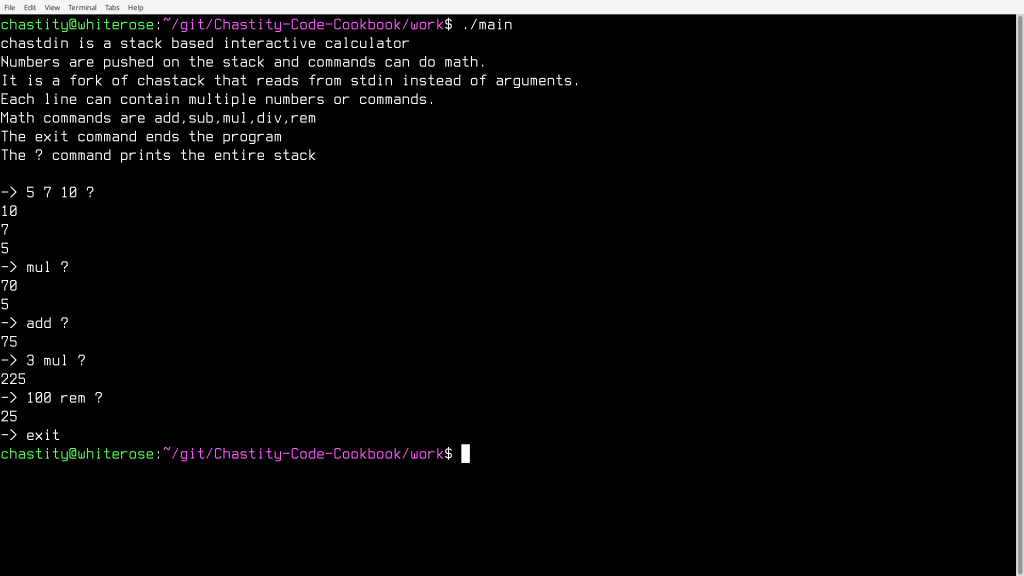
I really did it this time. I translated all of my Intel Assembly functions into RISC-V Assembly and rebuilt my calculator. It works flawlessly running under the rars simulator.
# chastelib test suite for RISC-V Assembly in RARS simulator

# this program tests the stdin extension of chastelib

# The same library of functions I commonly use in my Intel Assembly code
# have now been translated to RISC-V.
# All assembly code seen here is for the RARS simulator written in Java.

.data

##################################################################
# chastelib core specific variables                              #
#                                                                #
# These variables are used by the intstr function to convert an  #
# integer to a string and what radix and widthshould be used     #
# width means how many minimum digits including leading zeros    #
##################################################################

int_string: .space 32 #reserve space for 32 bytes for up to 32 bits if printed in binary
int_end: .byte 0 #the terminating zero of the integer string
radix: .byte 2   #the radix the number will be shown in
int_width: .byte 1 #by default

# These variables are for outputting special strings
# such as a newline, space, or a single character based on s0

space: .byte 0x20, 0
line:  .byte 0x0A, 0
char:  .byte 0, 0

##################################################################
# chastdin specific variables                                    #
#                                                                #
# these variables are used as the default controllers            #
# for the getstr and getline functions                           #
# buf stores keyboard input during those functions               #
# count stores how many bytes were read during system read calls #
# last_char stores the last character read                       #
# usually this will be a space, tab, or newline                  #
##################################################################

buf: .space 0x100
count: .word 0
last_char: .byte 0

# program specific variables
# These variables are for outputting specific messages
# or to simulate user input as integers in the strint function

string0: .ascii "calculator for RISC-V Assembly\n"
string1: .asciz "chastdin (Chastity's STanDard INput) extension\n\n"

string_add: .asciz "add"
string_sub: .asciz "sub"
string_mul: .asciz "mul"
string_div: .asciz "div"
string_rem: .asciz "rem"
string_setradix: .asciz "setradix"

string_help: .asciz "help"
string_exit: .asciz "exit"
string_putstack: .asciz "?"
string_clear: .asciz "clear"

string_prompt: .asciz "->"

string_err: .asciz "Error: invalid number or command: "
string_err1: .asciz "Error: need one number on stack for command: "
string_err2: .asciz "Error: need two numbers on stack for command: "

chastdin_help: .ascii "chastdin is a stack based interactive calculator\n"
              .ascii "that reads stdin for numbers and commands.\n"
              .ascii "Numbers are pushed on the stack for all math.\n"
              .ascii "Each line can contain multiple numbers or commands.\n\n"
              .ascii "Arithmetic commands are add,sub,mul,div,rem\n"
              .ascii "The exit command ends the program\n"
              .ascii "The ? command prints the entire stack\n"
              .asciz "The setradix command changes the radix for input and output\n"

.align 2  # Aligns the next item to a 4-byte (2^2) word boundary
chastack: .space 0x400 #reserve space for RPN calculator stack

.text

la s0, string0
jal putstr

# change radix for this program
li t0, 10    #load t0 register with the new radix
la t1, radix #load t1 register with the address the radix will go to
sb t0, 0(t1) #save t0 register (byte) to address t1

la s11, chastack #s11 will be used as the virtual stack pointer for this program

#print the help message at the beginning of the program
la s0, chastdin_help
jal putstr

#print the initial arrow prompt
la s0, string_prompt
jal putstr

main_loop:

la t1, last_char #load address of last_char
lb t0, 0(t1)     #get the last character

#show the arrow indicating we wait for the user to enter something
#but only show it when the last character is a newline
#otherwise it will print too many if multiple commands were entered on the same line
li t1, 0xA
bne t0, t1, skip_prompt
la s0, string_prompt
jal putstr
skip_prompt:

jal getstr  # read the string from standard input

#load the length of string just entered from (count)
la t1, count            #load address of count into t1
lw t0, 0(t1)            #load number of chars read at (count) address
beq t0, zero, main_loop #restart main_loop on empty string

#jal putline # print extra line for readability
#jal putstr # echo it to standard output
#jal putline

#s0 already contains string that was input
#s1 will be loaded with address of exit string
la s1, string_exit
jal strcmp
# end program if the string entered is equal to string_exit
beq t0, zero, exit

la s1, string_putstack
jal strcmp
beq t0, zero, command_putstack

la s1, string_clear
jal strcmp
beq t0, zero, command_clear

la s1, string_help
jal strcmp
beq t0, zero, command_help

#next we begin checking for actual math commands of arithmetic

la s1, string_add
jal strcmp
beq t0, zero, command_add

la s1, string_sub
jal strcmp
beq t0, zero, command_sub

la s1, string_mul
jal strcmp
beq t0, zero, command_mul

la s1, string_div
jal strcmp
beq t0, zero, command_div

la s1, string_rem
jal strcmp
beq t0, zero, command_rem

la s1, string_setradix
jal strcmp
beq t0, zero, command_setradix


#if the last string entered was not exit or a math command then
#The default command is to turn the argument into a number and push to stack
command_num:

mv s1, s0              #back up this string address to s1 register
jal strint             #try to get a number from the string pointed to by s0 register
beq a0, zero, num_push #branch to number push if zero errors in integer string

la s0, string_err    #load error message
jal putstr           #print error message
mv s0, s1            #load original command string
jal putstr           #print which command failed
jal putline
j num_push_end       #skip the push because this can't be used

num_push:            #push the number to the fake stack
addi s11, s11, 4     #increment the pointer by the size of the native int for this mode
sw s0, 0(s11)        #store the value we converted from the string with strint to this stack space
num_push_end:
j main_loop          #once value is pushed, continue the program

exit:
li a0, 0  #status
li a7, 93 #exit
ecall     #environment call

#################################################################################
# The following functions are used in the calculator program                    #
# The all jump back to the main_loop after they are done                        #
#                                                                               #
#################################################################################

#check if the stack has enough space for the last command
#this will print an error if less than two numbers were on the stack
#when using one of the math commands above

memory_check:

la s10, chastack        #load s10 with chastack address for branch comparison
blt s10, s11, memory_ok # if s10 is less than s11, no errors

print_stack_error:   #otherwise we print error message
la s0, string_err2   #get error message for less than 2 numbers on stack
jal putstr           #print error message
mv s0, s1            #get name of the command used
jal putstr           #print which command failed
jal putline
addi s11, s11, 4     #increment the pointer to what it was before the failed command
j main_loop          #now go back to main loop after error was printed

memory_ok:
sw zero, 4(sp)       #if no error, erase the old top of stack by storing zero
j main_loop          #and continue main_loop as normal


command_putstack: #print all numbers on the stack
la s9, chastack #load s9 with address of chastack
mv s10, s11     #copy value of s11 to s10
command_putstack_loop:

#is s10 equal to the address of stack start?
#if so, end the putstack loop
beq s9, s10 command_putstack_end
lw s0, 0(s10) #load the word at s10 into s0 for printing integer
addi s10, s10, -4 #subtract the word size from this temp stack index
jal putint
jal putline
j command_putstack_loop
command_putstack_end:
j main_loop


command_clear: #erase all numbers on the stack
la s9, chastack #load s9 with address of chastack
command_clear_loop:

#is s11 equal to the address of stack start?
#if so, end the clear loop
beq s9, s11 command_clear_end
sw zero, 0(s11) #store zero into the word at 0(s11) to erase it
addi s11, s11, -4 #subtract the word size from this temp stack index
j command_clear_loop
command_clear_end:
j main_loop


command_help:
la s0, chastdin_help
jal putstr
j main_loop

#add number on top of stack to the one below it
command_add:
lw t1, 0(s11)     #load the word at this chastack address
addi s11, s11, -4 #subtract the word size from s11
lw t0, 0(s11)     #load the word at this chastack address
add t0, t0, t1    #t0 = t0 + t1
sw t0, 0(s11)     #save the word at this chastack address
j memory_check    #check stack for errors after this command

#add number on top of stack to the one below it
command_sub:
lw t1, 0(s11)     #load the word at this chastack address
addi s11, s11, -4 #subtract the word size from s11
lw t0, 0(s11)     #load the word at this chastack address
sub t0, t0, t1    #t0 = t0 - t1
sw t0, 0(s11)     #save the word at this chastack address
j memory_check    #check stack for errors after this command

#mul number on top of stack to the one below it
command_mul:
lw t1, 0(s11)     #load the word at this chastack address
addi s11, s11, -4 #subtract the word size from s11
lw t0, 0(s11)     #load the word at this chastack address
mul t0, t0, t1    #t0 = t0 * t1
sw t0, 0(s11)     #save the word at this chastack address
j memory_check    #check stack for errors after this command

#divide and store quotient on stack
command_div:
lw t1, 0(s11)     #load the word at this chastack address
addi s11, s11, -4 #subtract the word size from s11
lw t0, 0(s11)     #load the word at this chastack address
divu t0, t0, t1    #t0 = t0 / t1
sw t0, 0(s11)     #save the word at this chastack address
j memory_check    #check stack for errors after this command

#divide and store remainder on stack
command_rem:
lw t1, 0(s11)     #load the word at this chastack address
addi s11, s11, -4 #subtract the word size from s11
lw t0, 0(s11)     #load the word at this chastack address
remu t0, t0, t1   #t0 = t0 % t1
sw t0, 0(s11)     #save the word at this chastack address
j memory_check    #check stack for errors after this command


#pop top of stack and set the current radix to it
#it has error checking and leaves the radix as is
#unless at least one number is on the stack
command_setradix:


la s10, chastack     #load s10 with chastack address for branch comparison
ble s11, s10, change_radix_no # if s11 is less than or equal to chastack address, branch to radix error
change_radix_yes:
lw t0, 0(s11)        #load t0 register with the new radix
la t1, radix         #load t1 register with the address the radix will go to
sb t0, 0(t1)         #save t0 register (byte) to address t1
sw zero, 0(s11)      #erase the old top of stack by storing zero
addi s11, s11, -4
j main_loop          #and continue main_loop as normal
change_radix_no:
la s0,string_err1    #get error message for less than 1 numbers on stack
jal putstr           #print error message
mv s0, s1            #get name of the command used
jal putstr           #print which command failed
jal putline

addi s11, s11, 4     #increment the pointer to what it was before the failed command
j main_loop          #now go back to main loop after error was printed

#################################################################################
# The following functions are independent of a specific RISC-V Operating System #
#                                                                               #
# intstr = convert integer into a string ready for printing                     #
# putint = prints integer using intstr and the OS specific putstr function      #
# strint = convert string into an integer                                       #
#                                                                               #
# The s0 register is used for pass data in or out of these functions            #
# See comments above those specific functions for full details                  #
#################################################################################

# The intstr function does several things at once and is the foundation for all integer output.
# It uses the global radix variable to know which radix or number base to use when turning the integer to a string
# It also uses the global int_width variable to determine how many leading zeros should be used for the string
# The purpose of this is to make numbers look good when lined up when they are printed in a list.
# radices 2 to 36 are supported. Digits higher than 9 will be capital letters

intstr:

la t1, radix     #load address of radix into t1
lb t2, 0(t1)     #load value of radix into t2
la t1, int_width #load address of width into t1
lb t4, 0(t1)     #load value of int_width into t4
li t3, 1         #load current number of digits, always 1

la t1, int_end   #t1=address of terminating zero in string
addi t1, t1, -1  #t1-- to go to lowest digit

digits_start:

remu t0, s0, t2  #t0=remainder of the previous division
divu s0, s0, t2  #s0=s0/t2 (divide s0 by the radix value in t2)

li t5, 10        #load t5 with 10 because RISC-V does not allow constants for branches

blt t0, t5, decimal_digit
bge t0, t5, hexadecimal_digit

decimal_digit:   #we go here if it is only a digit 0 to 9

addi t0, t0, 0x30

j save_digit

hexadecimal_digit:
addi t0, t0, -10
addi t0, t0, 0x41

save_digit:
sb t0, 0(t1)     #store byte from t0 at address t1
beq s0, zero, intstr_end
addi t1, t1, -1
addi t3, t3, 1
j digits_start

intstr_end:

li t0, 0x30
prefix_zeros:
bge t3, t4, end_zeros
addi t1, t1, -1
sb t0, 0(t1) # store byte from t0 at address t1
addi t3, t3, 1
j prefix_zeros
end_zeros:

mv s0, t1

ret

# this function calls intstr to convert the s0 register into a string
# then it uses the system specific putstr call to print the string
# it also uses the stack to save the value of s0 and ra (return address)
# this way, s0 is restored to the value it had before this function
# restoring ra is required because it is modified during calls to other functions

putint:

addi sp, sp, -8
sw ra, 0(sp)
sw s0, 4(sp)

jal intstr
jal putstr

lw ra, 0(sp)
lw s0, 4(sp)
addi sp, sp, 8

ret

# strint takes the string at address pointed to by s0 register
# and then loads the s0 register with an integer equivalent value
# the a0 register is returned with the number of errors that happened
# programs can use this to find if a user entered a valid number
# number is intepreted according to the current radix

strint:

li a0, 0         #load zero into register for error counting

la t1, radix     #load address of radix into t1
lb t2, 0(t1)     #load value of radix into t2

mv t1, s0        #copy string address from s0 to t1
li s0, 0

read_strint:
lb t0, 0(t1)
addi t1, t1, 1
beq t0, zero, strint_end

#if char is below '0' or above '9', it is outside the range of these and is not a digit
li t5, 0x30
blt t0, t5, not_digit
li t5, 0x39
blt t5, t0, not_digit

#but if it is a digit, then correct and process the character
is_digit:
andi t0, t0, 0xF
j process_char

not_digit:
#it isn't a digit, but it could be an alphabet character
#which counts as a digit in a higher base

# if char is below 'A' or above 'Z', it is outside the range of these and is not capital letter
li t5, 0x41
blt t0, t5, not_upper
li t5, 0x5A
blt t5, t0, not_upper

is_upper:
li t5, 0x41
sub t0, t0, t5
addi t0, t0, 10
j process_char

not_upper:

# if char is below 'a' or above 'z', it is outside the range of these and is not lowercase letter
li t5, 0x61
blt t0, t5, not_lower
li t5, 0x7A
blt t5, t0, not_lower

is_lower:
li t5, 0x61
sub t0, t0, t5
addi t0, t0, 10
j process_char

not_lower:

# if we have reached this point, result invalid and end function
# this is only reached if the byte was not a valid digit or alphabet character
j strint_end_error

process_char:

blt t2, t0 strint_end_error #if this value is above or equal to radix, it is too high despite being a valid digit/alpha

mul s0, s0, t2 # multiply s0 by the radix
add s0, s0, t0 # add the correct value of this digit

j read_strint # jump back and continue the loop if nothing has exited it

strint_end_error:  #we jump here if there was an error with one of the chars
addi a0, a0, 1 #add 1 to the a0 register indicating an error occurred

strint_end: #we jump here when no errors happened
ret

###############################################################################
# This putstr function is my most portable function for RISC-V simulators     #
# It calculates the length of a zero terminated string before printing it     #
# This is the same way used in my Intel Assembly programs for DOS and Linux   #
# This function was written to operate the same in both RARS and riscemu      #
###############################################################################

putstr:

mv t1, s0                       # t1 will be used as an index register

putstr_strlen_start:
lb t0, 0(t1)                    # load byte into t0 from address of t1
beq t0, zero, putstr_strlen_end # if t0==0, then we jump to the end of the loop.
addi t1, t1, 1                  # go to next byte
j putstr_strlen_start           # jump to start of the loop
putstr_strlen_end:

li a0, 1                        # STDOUT file number
mv a1, s0                       # address of string
sub a2, t1, s0                  # length of string
li a7, 64                       # write call number
ecall                           # environment call

ret

#############################################################################
# The next four 3 functions print things to standard output                 #
# All of them use the putstr function above to achieve the output           #
# They use the stack to preserve the values of the s0 and t1 registers used #
# They also use global variables in the data section                        #
#############################################################################

#the putchar function, which is named after the C language function of the same name
#prints the lowest byte of the s0 register as a byte or character to standard output

putchar:

addi sp, sp, -12
sw ra, 0(sp)
sw s0, 4(sp)
sw t1, 8(sp)

la t1, char
sb s0, 0(t1)
la s0, char
jal putstr

lw ra, 0(sp)
lw s0, 4(sp)
lw t1, 8(sp)
addi sp, sp, 12

ret

# the putspace function prints a space to standard output

putspace:

addi sp, sp, -8
sw ra, 0(sp)
sw s0, 4(sp)

la s0, space
jal putstr

lw ra, 0(sp)
lw s0, 4(sp)
addi sp, sp, 8

ret

# the putline function prints a newline to standard output

putline:

addi sp, sp, -8
sw ra, 0(sp)
sw s0, 4(sp)

la s0, line
jal putstr

lw ra, 0(sp)
lw s0, 4(sp)
addi sp, sp, 8

ret

##########################################################################
# chastdin extension functions                                           #
#                                                                        #
# all functions that deal with getting strings and characters from stdin #
##########################################################################

# the getstr function will read a string into a buffer from stdin
# and return it in the s0 register for printing with the putstr function
# the (count) variable will also return the number of characters

getstr:

li t0, 0                        # use t0 register to track chars read
la a1, buf                      # load address of buffer for read string
li a2, 1                        # read only 1 byte for each env call

getstr_chars:

li a0, 0                        # STDIN file number
li a7, 63                       # read call number
ecall                           # environment call

# Branch to label getstr_end if a0 is less than a2
# a0 is the return value of this environment read call
# as will be -1 on error or 1 if successful
# because we read 1 character at a time

blt a0, a2, getstr_end

# if no error, test range of the last byte

lb t1, 0(a1)      #load byte at address (a1) into t1 register

# if t1 is less than 0x21
# or t1 is more than 0x7E
# branch to function end because it is outside of print range

li t2, 0x21
blt t1, t2, getstr_end
li t2, 0x7E
blt t2, t1, getstr_end

# otherwise, proceed to read more characters
add t0, t0, a0    # add to read counter
addi a1, a1, 1    # add 1 to buffer pointer register a1
j getstr_chars # unconditional jump to getstr_chars

getstr_end:

la t2, count       #load address of count into t2
sw t0, 0(t2)       #store number of chars read at (count) address
la t2, last_char   #load address of last_char into t2
sb t1, 0(t2)       #store last byte at (last_char) address
sb zero, 0(a1)     #store byte zero to terminate string
la s0, buf         #return address of buf in s0 register

ret


# the getline function will read a string into a buffer from stdin
# and return it in the s0 register for printing with the putstr function
# the (count) variable will also return the number of characters
# this function will get the whole line including spaces

getline:

li t0, 0                        # use t0 register to track chars read
la a1, buf                      # load address of buffer for read string
li a2, 1                        # read only 1 byte for each env call

getline_chars:

li a0, 0                        # STDIN file number
li a7, 63                       # read call number
ecall                           # environment call

# Branch to label getline_end if a0 is less than a2
# a0 is the return value of this environment read call
# as will be -1 on error or 1 if successful
# because we read 1 character at a time

blt a0, a2, getline_end

# if no error, test range of the last byte

lb t1, 0(a1)      #load byte at address (a1) into t1 register

# if t1 is less than 0x20
# or t1 is more than 0x7E
# branch to function end because it is outside of print range

li t2, 0x20
blt t1, t2, getline_end
li t2, 0x7E
blt t2, t1, getline_end

# otherwise, proceed to read more characters
add t0, t0, a0    # add to read counter
addi a1, a1, 1    # add 1 to buffer pointer register a1
j getline_chars # unconditional jump to getline_chars

getline_end:

la t2, count       #load address of count into t2
sw t0, 0(t2)       #store number of chars read at (count) address
la t2, last_char   #load address of last_char into t2
sb t1, 0(t2)       #store last byte at (last_char) address
sb zero, 0(a1)     #store byte zero to terminate string
la s0, buf         #return address of buf in s0 register

ret


# Short Description of strlen:
# The strlen function gets the length of string in s0 and returns it in s0
# This is the same algorithm used in my putstr function but is independent of an operating system.

strlen:

mv t1, s0                       # t1 will be used as an index register

strlen_start:
lb t0, 0(t1)                    # load byte into t0 from address of t1
beq t0, zero, strlen_end        # if t0==0, then we jump to the end of the loop.
addi t1, t1, 1                  # go to next byte
j strlen_start                  # jump to start of the loop
strlen_end:

sub s0, t1, s0                  # return length of string in s0

ret


# Short Description of strcmp:
# strcmp compares the string at s0 to the one at s1
# t0 returns 0 if the strings are the same and non zero if different
# the algorithm is simple but I will explain it for those who are confused

# Long Description of strcmp:
# each byte from each string is loaded into the t0 and t1 registers
# the bytes are compared. if they are different, then we jump to the end
# However, if they are the same, then we check if one of them is zero
# if it is zero, this also jumps to the end of the function
# If neither jump took place, then we jump to the start of the loop
# but when the function finally ends t1 will be subtracted from t0
# this ensures that the t0 register returns zero if the final characters are the same
# a zero result in t0 also guarantees that both strings are equal

strcmp:

mv a0, s0 # move pointer s0 to a0
mv a1, s1 # move pointer s1 to a1

strcmp_start:

#read a byte from each string
lb t0, 0(a0)
lb t1, 0(a1)
#if the two bytes are not equal end comparison
bne t0, t1, strcmp_end

#but if they are equal, test for zero
#if one of them is zero, also end the loop
beq t0, zero, strcmp_end

addi a0, a0, 1                  # go to next byte
addi a1, a1, 1                  # go to next byte

j strcmp_start

strcmp_end:

#subtract t1 from t0
#if t0 is still zero after the function returns
#it means that the strings are equal
sub t0, t0, t1

ret