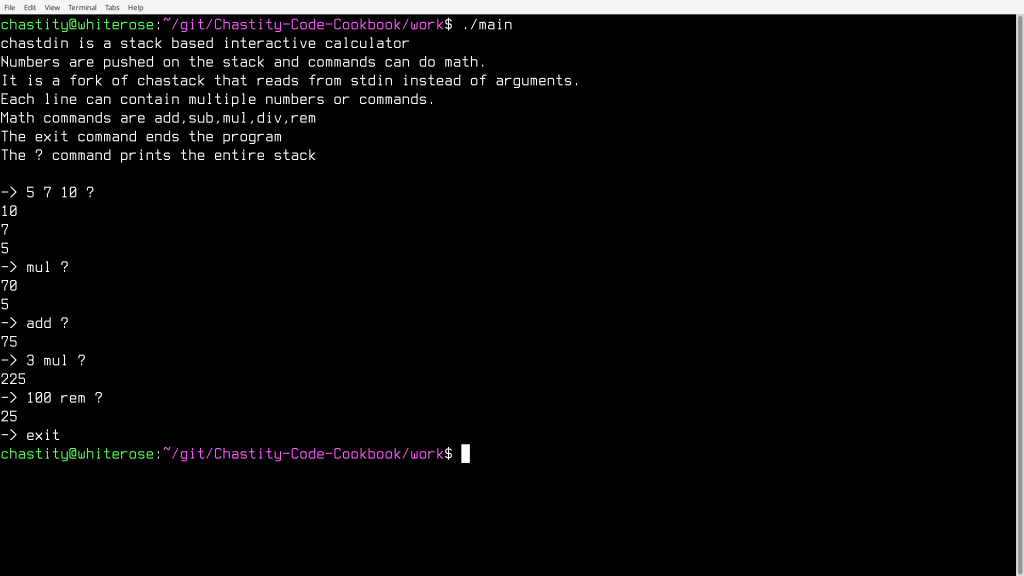
I wrote another program which is actually a modification of chastack. This gets input from a user while it is running. Despite how simple it may seem, I had to work at reading from the keyboard because there are multiple ways to read a string from the user. I may add more to this program later, but it has all the important functions of a stack based calculator. Here is a screenshot that shows me using it. You can probably figure out what the commands do based on their name and the numbers printed. I have also attached the full assembly source code to this post.
main.asm
format ELF executable
entry main

include 'chastelib32.asm'
include 'chastdin32.asm'

main:

mov dword[radix],10    ;I can choose the radix for integer output!
mov dword[int_width],1 ;and the width of each integer for padded zeros

mov ebp,chastack       ;mov the address of the beginning of the stack to ebp registers

;this program does not read command line arguments
;it always displays a message to tell user what the program does
mov eax,string_help
call putstring

mov [last_char],0xA ;set newline as last_char so prompt will display

main_loop:

;show the arrow indicating we wait for the user to enter something
;but only show it when the last character is a newline
;otherwise it will print too many if multiple commands were entered on the same line
cmp [last_char],0xA
jnz skip_prompt
mov eax,string_prompt
call putstring
skip_prompt:

call getstring ;get string and return address in eax

;we must restart the loop in case of an empty string
;if we didn't, strint would read the empty string and return 0
;then zero would be pushed to the stack, which is not what we want

cmp dword[count],0 ;were there zero characters read?
jz main_loop ;if yes, this was an empty string, retry input

mov esi,eax    ;mov string to esi for string comparison

;Now we process the string the user entered
;First, we will try testing for commands
;If any of the predefined strings match the string in esi
;We jump to the label for that command

mov edi,string_add
call strcmp
jz command_add

mov edi,string_sub
call strcmp
jz command_sub

mov edi,string_mul
call strcmp
jz command_mul

mov edi,string_div
call strcmp
jz command_div

mov edi,string_rem
call strcmp
jz command_rem

mov edi,string_query
call strcmp
jz command_query

mov edi,string_clear
call strcmp
jz command_clear

mov edi,string_exit
call strcmp
jz command_exit

;The default command is to turn the argument into a number and push to stack
command_num:

mov eax,esi          ;mov the string to eax for processing numbers
call strint          ;try to get a number from the string pointed to by eax
cmp [strint_error],0 ;did we have zero errors in the strint function?
jz num_push          ;if there were no errors, push this to stack

mov eax,string_err
call putstring
mov eax,esi
call putstring
call putline
jmp num_push_end ;skip the push because this can't be used

num_push:        ;push the number to the fake stack
add ebp,4
mov [ebp],eax
num_push_end:
jmp main_loop

;These are the labels and code for each of the commands
;When a command is done, we jump back to the beginning of the loop

command_add:
mov eax,[ebp]
mov dword[ebp],0
sub ebp,4
add [ebp],eax
jmp main_loop

command_sub:
mov eax,[ebp]
mov dword[ebp],0
sub ebp,4
sub [ebp],eax
jmp main_loop

command_mul:
mov ebx,[ebp]
mov dword[ebp],0
sub ebp,4
mov eax,[ebp]
mov edx,0     ;zero edx before multiply
mul ebx       ;multiply eax with value in ebx
mov [ebp],eax
jmp main_loop

command_div:
mov ebx,[ebp]
mov dword[ebp],0
sub ebp,4
mov eax,[ebp]
mov edx,0 ;zero edx before divide
div ebx   ;divide eax with value in ebx
mov [ebp],eax ;store quotient on stack
jmp main_loop

command_rem:
mov ebx,[ebp]
mov dword[ebp],0
sub ebp,4
mov eax,[ebp]
mov edx,0 ;zero edx before divide
div ebx   ;divide eax with value in ebx
mov [ebp],edx ;store remainder on stack
jmp main_loop

command_query: ;print all numbers on the stack
push ebp ;save value of ebp
command_query_loop:
cmp ebp,chastack ;is ebp equal to the address of stack start?
jz command_query_end  ;if it is, end the putstack loop
mov eax,[ebp]
sub ebp,4
call putint_and_line
jmp command_query_loop
command_query_end:
pop ebp ;restore ebp to what it was before this command
jmp main_loop

command_clear: ;erase all numbers on the stack
command_clear_loop:
cmp ebp,chastack ;is ebp equal to the address of stack start?
jz command_clear_end  ;if it is, end the putstack loop
mov dword[ebp],0
sub ebp,4
jmp command_clear_loop
command_clear_end:
jmp main_loop

command_exit: ;end the program

main_loop_end:

mov eax,1        ;exit (kernel opcode 1 on 32 bit systems)
mov ebx,0        ;return 0 status on exit - 'No Errors'
int 80h          ;system call for 32-bit Linux kernel

argc dd 0

string_err db 'Error: invalid number or command: ',0 ;Generic error message
string_add db 'add',0
string_sub db 'sub',0
string_mul db 'mul',0
string_div db 'div',0
string_rem db 'rem',0
string_exit db 'exit',0
string_query db '?',0
string_clear db 'clear',0

string_prompt db '-> ',0

string_help db 'chastdin is a stack based interactive calculator',0xA
            db 'Numbers are pushed on the stack and commands can do math.',0xA
            db 'It is a fork of chastack that reads from stdin instead of arguments.',0xA
            db 'Each line can contain multiple numbers or commands.',0xA
            db 'Math commands are add,sub,mul,div,rem',0xA
            db 'The exit command ends the program',0xA
            db 'The ? command prints the entire stack',0xA,0xA,0

;This program uses a virtual stack for convenience and portability
;I allocate memory for a virtual stack that we can index as if it was the real stack
;I name it "chastack" for Chastity's stack.

db 6 dup 0 ;extra padding bytes
chastack: rd 0x100
chastdin32.asm
;Chastity's Standard Input header file
;The functions here are designed to read strings and numbers from standard input.

;getstring ;read characters from stdin until the first whitespace
;getline   ;read characters from stdin until the first newline,EOF,tab,etc.
;strcmp    ;compare two strings similar to the same function in C

;these variables are used as the default controllers
;for the getstring and getline functions
;buf stores keyboard input during those functions
;count stores how many bytes were read
;last_char stores the last character read
;usually this will be a space, tab, or newline

buf db 0x100 dup '?'
count dd 0
last_char db 0

;summary
;the getstring function is the reverse function of putstring
;instead of printing a string to standard output
;it reads a string from standard input (AKA the keyboard)

;details
;the getstring function is designed to get a string of text
;which is terminated by whitespace or any non printable character
;the idea is that multiple strings can be passed on one line
;separated by spaces, similar to command line arguments
;this function was written for the specific purpose of converting any of
;my programs that used command line arguments to read from stdin instead

getstring:

mov [count],0 ;set count of characters read during this function to zero
mov edx,1     ;number of bytes to read
mov ecx,buf   ;address to store the bytes

getstring_chars:

mov ebx,0     ;read from stdin
mov eax,3     ;invoke SYS_READ (kernel opcode 3)
int 80h       ;call the kernel

cmp eax,1     ;was 1 character read?
jnz getstring_end ; if not, then end this loop

mov al,[ecx]  ;mov last character read into al register

;check if this character is in the proper range to be part of the string

cmp al,0x21      ;compare with 0x21 (!=exclamation)
jb getstring_end ;jump if below to getstring_end label
cmp al,0x7E      ;compare with 0x7E (tilde)
ja getstring_end ;jump if above to getstring_end label

;if neither jump happened, keep the character and

inc [count]   ;increment how many characters we have read
inc ecx       ;increment address where next byte is read from
jmp getstring_chars ;jump back to start of loop and keep reading

getstring_end:

mov [last_char],al ;save the last character read
mov byte[ecx],0 ;terminate this string with a zero

mov eax,buf ;mov the buffer address to eax for returning the string

ret

;the getline function gets an entire line of text from the keyboard
;calling this function allows for a string that can contain spaces
;it considers as anything outside the range of 0x20 to 0x7E as the end of line character
;this is because the end of the line might be 0x0A on Linux
;or it might be 0x0D,0x0A on DOS or Windows.
;technically, it means tab will also terminate a line
;the intended use of this function is to read a filename
;filenames can contain spaces

getline:

mov [count],0 ;set count of characters read during this function to zero
mov edx,1     ;number of bytes to read
mov ecx,buf   ;address to store the bytes

getline_chars:

mov ebx,0     ;read from stdin
mov eax,3     ;invoke SYS_READ (kernel opcode 3)
int 80h       ;call the kernel

cmp eax,1     ;was 1 character read?
jnz getline_end ; if not, then end this loop

mov al,[ecx]  ;mov last character read into al register

;check if this character is in the proper range to be part of the string

cmp al,0x20    ;compare with 0x20 (space)
jb getline_end ;jump if below to getstring_end label
cmp al,0x7E    ;compare with 0x7E (tilde)
ja getline_end ;jump if above to getstring_end label

;if neither jump happened, keep the character and

inc [count]       ;increment how many characters we have read
inc ecx           ;increment address where next byte is read from
jmp getline_chars ;jump back to start of loop and keep reading

getline_end:

mov byte[ecx],0 ;terminate this string with a zero

mov eax,buf ;mov the buffer address to eax for returning the string

ret

;summary
;strcmp compares the string at esi to the one at edi
;eax returns 0 if the strings are the same and 1 if different
;the algorithm is simple but I will explain it for those who are confused

;details
;eax is initialized to zero
;a byte from each string is loaded into the al and bl registers
;the bytes are compared. if they are different, then we jump to the end
;However, if they are the same, then we check if one of them is zero
;for this purpose it doesn't matter whether we compare al or bl with zero
;because it is known that they are the same if the jnz did not take place
;if it is zero, this also jumps to the end of the function
;If neither jump took place, then we jump to the start of the loop
;but when the function finally ends bl will be subtracted from al
;this ensures that the function returns zero if the final characters are the same
;ebx,esi,and edi are preserved but eax is the return value
;also, the sub instruction at the end of the function also updates the flags
;so you can "jz" or "jnz" to a label after calling this function based on results

strcmp:

push ebx
push esi
push edi

mov eax,0

strcmp_start:

;read a byte from each string
mov al,[edi]
mov bl,[esi]
cmp al,bl
jnz strcmp_end

cmp al,0
jz strcmp_end

inc edi
inc esi

jmp strcmp_start

strcmp_end:
sub al,bl

pop edi
pop esi
pop ebx

ret


Leave a Reply