Tag: technology

  • Learning POSIX System Calls

    I have been doing Assembly language programming for some time now, and yet only today did I take the time to read the documentation and some online examples to help me learn how to use the system calls from C programs.

    On Linux systems like the Debian one I use, there are documentation pages already installed. There are hundreds of them, and yet only 6 are required to create all of my command-line tools.

    The following commands can be used to read each one of the 6 fundamental system calls available on Linux and Unix systems for C programmers.

    Six Supreme System Calls

    man 2 open
    man 2 close
    man 2 read
    man 2 write
    man 2 lseek
    man 2 exit
    

    My command line utilities, I have been creating such as chastehex, chastecmp, and chastext used these system calls in their assembly versions. However, I traditionally used the C standard library for the C versions of these programs.

    But after reading about the system calls and seeing some examples, I realized that I could make copies and rewrite these tools by calling only system calls. During this process, I learned how much easier they are to use compared to the C library functions.

    Here is a summary of each of these functions and how they are used in my programs.

    All of my tools use “open” to open a file and then “close” to close it when I am done with it. There can be no confusion as to what these functions do because of their names.

    Similarly, “read” and “write” do exactly what their names imply. They operate the same as fread and fwrite do in stdio. But they take only 3 arguments instead of 4, which makes a lot of sense. You give them a pointer, and then you tell them exactly how many bytes you want to read from or write to a file descriptor previously assigned with “open”.

    The “lseek” function stands for long seek and is capable of moving to a different position in a file before the next read or write operation. Not every program needs this, but chastehex does because one of the arguments is an address in hexadecimal to read or write. Jumping around in a file is sometimes necessary if you are working with large files or the address matters a lot.

    The final call to any program is “exit” because it ends the program. There isn’t much to say about it except that it also lets you return a number to the operating system. Usually, 0 means no errors happened, and a value of anything else indicates a specific type of error you have defined in your program. All of my programs return 1 if a file could not be opened.

    Each of these functions has various arguments that have clearly defined meanings. The return values are also specified in their manual pages.

    Interestingly, these calls are available on every operating system that I know about except for Windows. However, considering how easy these are to implement using the C standard library, it would be possible to write Windows versions of these. In fact, some people have already done this.

    See the Cygwin and MinGW projects for more information about how to use these calls on Windows. For all other operating systems: Linux, Unix (FreeBSD, OpenBSD, NetBSD, Minix, and ChromiumOS) These calls are already available if you have a working C compiler.

    You might wonder why I spent the time learning and explaining this. It is because having a super small library of functions that I can memorize allows faster programming and less time spent looking at my references when I have forgotten which order the arguments go in.

    This knowledge gives me an alternative library of functions I can use that is easier than the C standard library. However, I am keeping both versions of every program I have written.

    But the final point I want to make is that because these are the same calls used in my Assembly programs, I can make C programs that map 1 to 1 when comparing and teaching Assembly in the books I write!

  • new program: chastearg

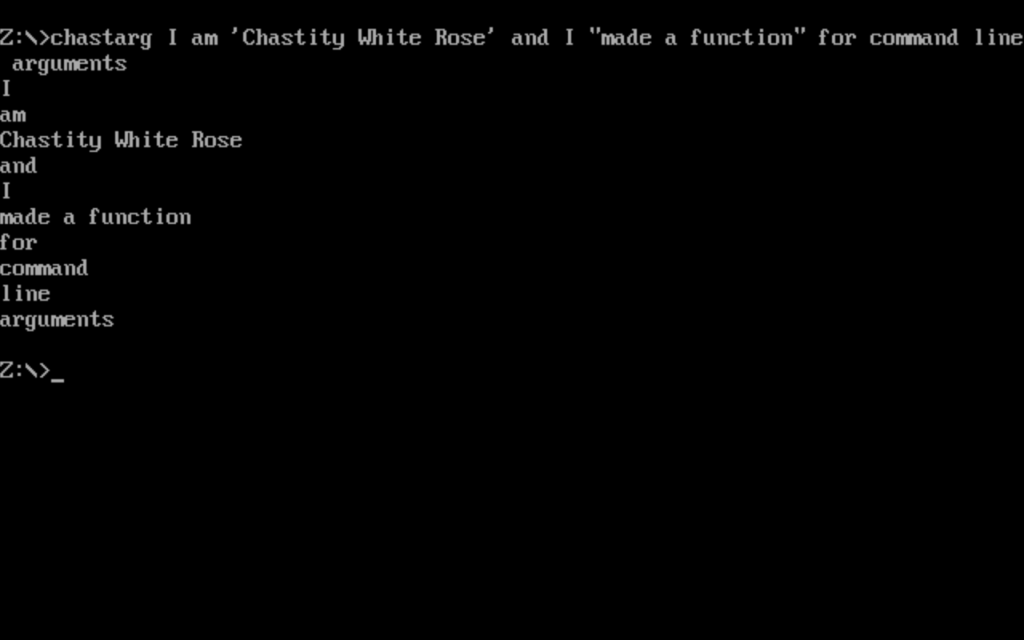
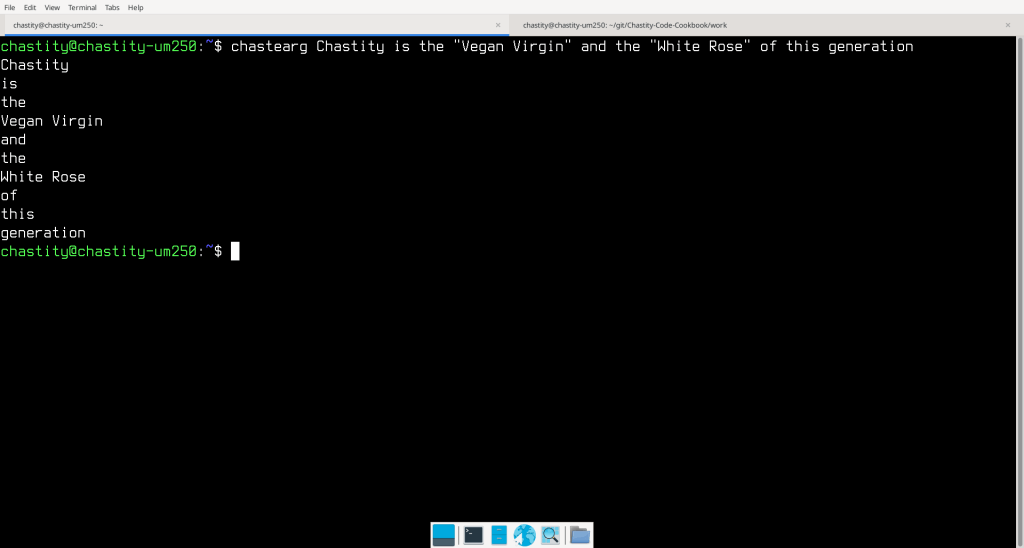
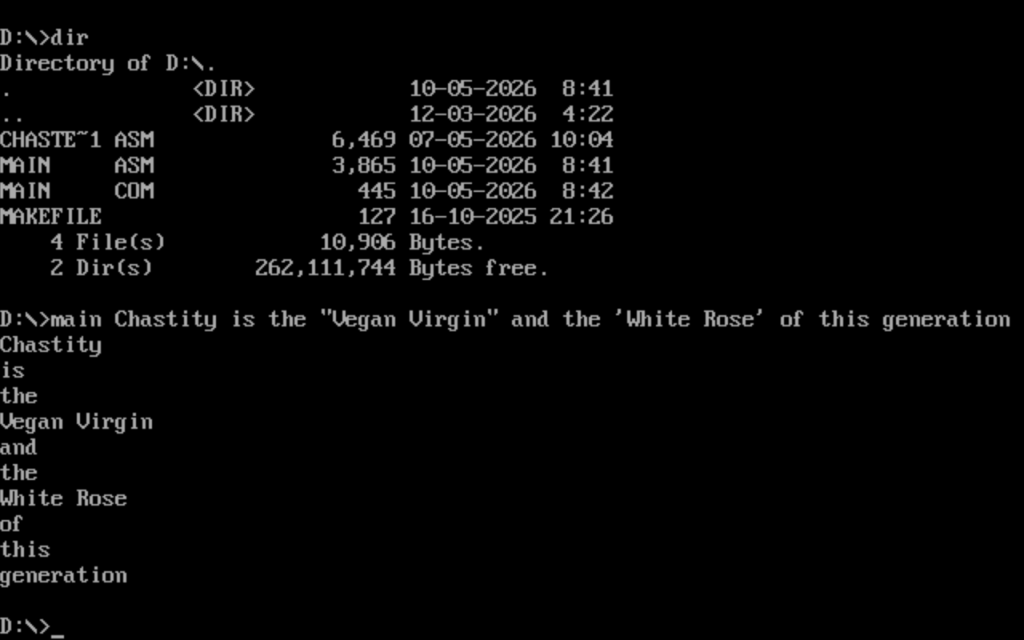
    I wrote a small program for both Linux and DOS assembly. It is very easy to explain what it does with some pictures. The first picture is what it looks like when I use the Linux version on my Debian system. The second is the DOS version running under the DOSBOX emulator.

    As you can see, the words surrounded by quotes are displayed on the same line because they count as one argument. Linux handles this by default but DOS needed some help. I had to rewrite my entire argument filter for the DOS version.

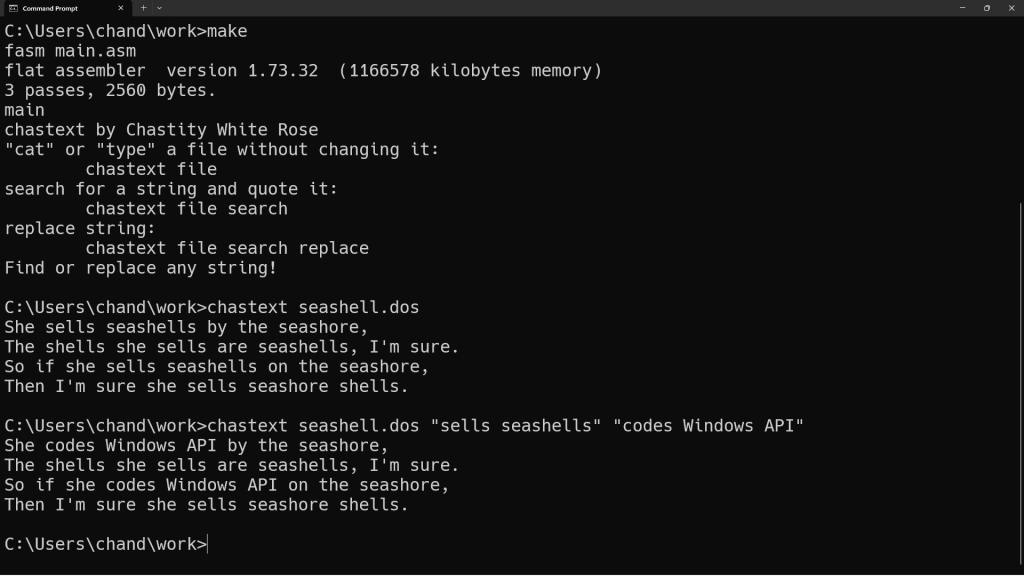
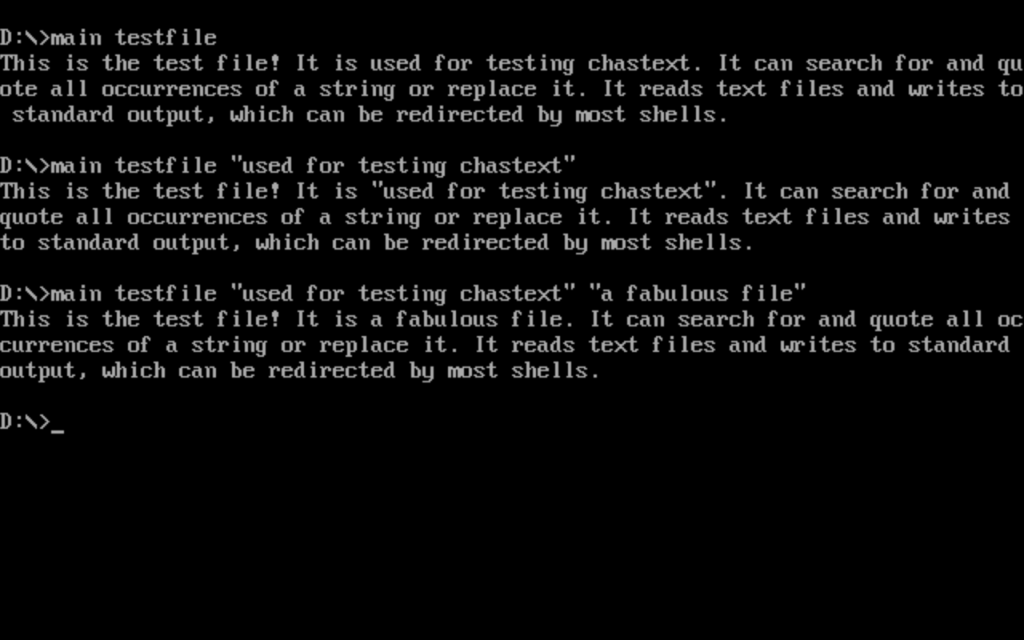
    The reason I wrote this project and worked to make it consistent for both DOS and Linux is because I wanted to do an upgrade to the DOS version of chastext. As you can see from the picture below, I have succeeded!

    When I first posted about my chastext project, some people said it was useless because we can already use sed for Linux or other tools for find and replace. However, my assembly versions are simpler and faster than sed when you don’t need regular expressions. They also don’t depend on anything other than interrupt calls of the operating system.

    But more importantly, their argument is stupid. Writing similar programs to existing programs is a great programming exercise and is especially important for tiny projects where I don’t want to implement all the features of a program or its dependencies. I can also bring the program to platforms that the original program does not support, such as DOS.

    This attitude some people have is one that I don’t like. Should I not sing just because Taylor Swift can sing better than me? Should I not play the piano just because other people can do it better than me? Or should I not play Chess just because I can’t do it as well as Magnus Carlsen or a chess engine?

    I started programming for the joy of learning and writing me own things. I often reinvent the wheel such as how I wrote my own strlen and strcmp functions for my chastext project. I don’t have access to the C standard library with the way I am doing it. I can’t imagine criticizing someone else’s programming project just because it has features to a similar tool that may exist. Otherwise, I would be saying Linus Torvalds should not have created Linux just because Unix and Minix existed which had similar file systems.

  • new program: chastext

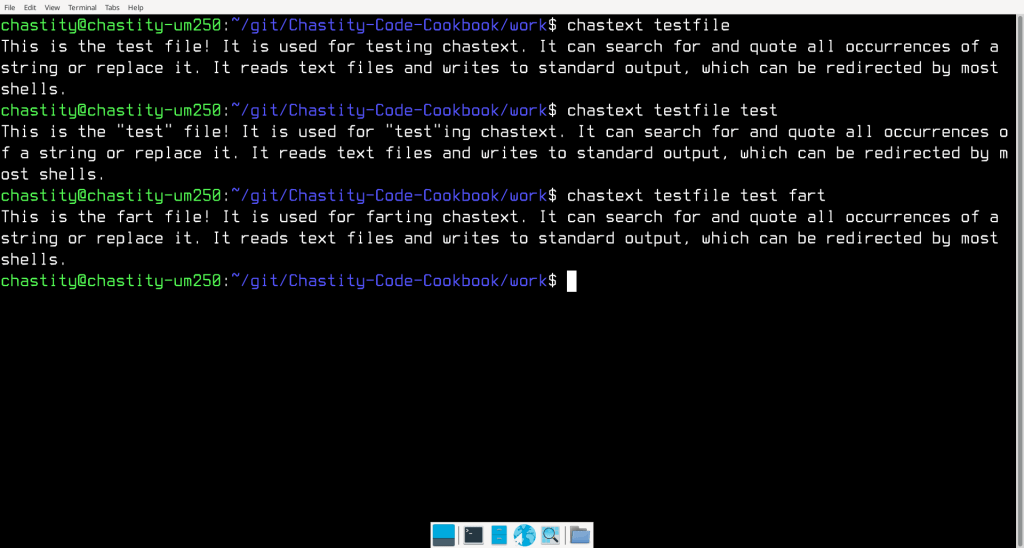
    I wrote another assembly program. This one works with text files instead of binary files. It can do a search and replace of all occurrences of a string in a text file. This could be useful for translating programs between programming languages or editing text configuration files. This screenshot is an example of how it can be used.

    main.asm

    ;Linux 32-bit Assembly Source for chastext
    ;a basic text search and replace program
    format ELF executable
    entry main
    
    ;a reduced form of chastelib without functions this program doesn't use
    include 'chastext-chastelib32.asm'
    
    main:
    
    ;radix will be 16 because this whole program is about hexadecimal
    ;mov dword [radix],16 ; can choose radix for integer input/output!
    
    pop eax
    mov [argc],eax ;save the argument count for later
    
    cmp [argc],1
    ja help_skip ;if more than 1 argument is given, skip the help message and process the other arguments
    
    help:
    mov eax,help_message
    call putstring
    jmp main_end
    help_skip:
    
    pop eax ;pop the next arg which is the name of the program we are running
    
    get_filename:
    pop eax ;pop the next arg which is the name of the file we will open
    
    mov [filename],eax ; save the name of the file we will open to read
    
    arg_open_file:
    
    ;Linux system call to open a file
    
    mov ecx,0   ;open file in read only mode
    mov ebx,eax ;filename should be in eax before this function was called
    mov eax,5   ;invoke SYS_OPEN (kernel opcode 5)
    int 80h     ;call the kernel
    
    cmp eax,0
    jns file_open_no_errors ;if eax is not negative/signed there was no error
    
    ;Otherwise, if it was signed, then this code will display an error message.
    
    mov eax,open_error_message
    call putstr_and_line
    
    jmp main_end ;end the program because we failed at opening the file
    
    file_open_no_errors:
    
    mov [filedesc],eax ; save the file descriptor number for later use
    
    ;before we just textdump or "cat" the file, we need to check for the existence of more arguments which will modify the output
    
    cmp [argc],3
    jb search_skip
    
    pop eax ;pop the next arg which is the string we are searching for
    mov [string_search],eax
    
    search_skip:
    
    cmp [argc],4
    jb replace_skip
    
    pop eax ;pop the next arg which is the string we are searching for
    mov [string_replace],eax
    
    replace_skip:
    
    ;now we begin displaying the file but also searching for the search string if it exists. We will check for these based on the number of arguments like we did earlier
    
    textdump:
    
    mov edx,1            ;number of bytes to read
    mov ecx,byte_array   ;address to store the bytes
    mov ebx,[filedesc]   ;move the opened file descriptor into EBX
    mov eax,3            ;invoke SYS_READ (kernel opcode 3)
    int 80h              ;call the kernel
    
    mov [bytes_read],eax
    
    cmp eax,0
    jnz file_success ;if more than zero bytes read, proceed to display
    
    jmp main_end
    
    ; this point is reached if file was read from successfully
    
    file_success:
    
    cmp [argc],2 ;if only 2 arguments, just putchar and read next one
    jnz putchar_skip
    
    ;normally, we will print the last read character
    mov al,[byte_array]
    call putchar
    
    putchar_skip:
    
    cmp [argc],3 ;if not enough arguments, skip the search string section
    jb textdump
    
    mov ebx,[string_search]
    
    mov al,[ebx]
    mov ah,[byte_array]
    cmp al,ah ;compare the first character of search string with the byte read already
    jz search_start ; if they are equal, skip putchar and begin searching for the string
    
    ;otherwise, if they are not equal, just putchar the last byte read and repeat the loop
    mov al,[byte_array]
    call putchar
    jmp textdump
    
    search_start:
    mov eax,[string_search]
    call strlen ;get the length of the search string
    
    ;attempt to read the length-1 bytes because the first one is already read into the byte array
    
    dec eax
    mov edx,eax            ;number of bytes to read
    mov ecx,byte_array+1   ;address to store the bytes
    mov ebx,[filedesc]     ;move the opened file descriptor into EBX
    mov eax,3              ;invoke SYS_READ (kernel opcode 3)
    int 80h                ;call the kernel
    
    mov ebx,ecx
    add ebx,eax
    mov byte [ebx],0 ;terminate the string with zero
    
    mov esi,[string_search]
    mov edi,byte_array
    call strcmp ;compare these two strings
    
    cmp eax,0 ;test if they are the same (if eax returned zero)
    jnz normal_print ;if they are not a match print them unmodified and unquoted
    
    ;but if they are a match, then we either quote them
    ;or replace them if a replacement string is available
    
    cmp [argc],4 ;if less than 4 args, no replacement exist, so we quote the strings
    jb print_quotes
    
    ;otherwise, we will print the replacement string instead of the original!
    
    mov eax,[string_replace]
    call putstring ;print the string
    
    jmp normal_print_skip
    
    print_quotes:
    ;print quotes around matched string
    mov al,'"'
    call putchar
    
    mov eax,byte_array
    call putstring ;print the string
    
    mov al,'"'
    call putchar
    
    jmp normal_print_skip
    
    normal_print: ;print normal / unquoted because it doesn't match
    
    mov eax,byte_array
    call putstring ;print the string
    
    normal_print_skip:
    
    jmp textdump
    
    main_end:
    
    ;this is the end of the program
    ;we close the open file and then use the exit call
    
    ;Linux system call to close a file
    
    mov ebx,[filedesc] ;file number to close
    mov eax,6          ;invoke SYS_CLOSE (kernel opcode 6)
    int 80h            ;call the kernel
    
    mov eax, 1  ; invoke SYS_EXIT (kernel opcode 1)
    mov ebx, 0  ; return 0 status on exit - 'No Errors'
    int 80h
    
    ;a function to get the length of string in eax and return the integer in eax
    
    strlen:
    
    mov ebx,eax ; copy eax to ebx. ebx will be used as index to the string
    
    strlen_start: ; this loop finds the length of the string as part of the putstring function
    
    cmp [ebx],byte 0 ; compare byte at address ebx with 0
    jz strlen_end ; if comparison was zero, jump to loop end because we have found the length
    inc ebx
    jmp strlen_start
    
    strlen_end:
    sub ebx,eax ;subtract start pointer from current pointer to get length of string
    
    mov eax,ebx ;copy the string length back to eax
    
    ret
    
    ;compare the string at esi to the one at edi
    
    strcmp:
    
    mov eax,0 ;this will be stay zero unless the strings are different
    
    strcmp_start:
    mov bl,[edi]
    cmp bl,0
    jz strcmp_end
    mov bh,[esi]
    cmp bh,0
    jz strcmp_end
    
    inc edi
    inc esi
    
    cmp bl,bh
    jz strcmp_start ;if they are the same, continue to next character
    
    inc eax ;if they were different, eax will be incremented and the function ends
    
    strcmp_end:
    ret
    
    help_message db 'chastext by Chastity White Rose',0Ah,0Ah
    db '"cat" a file:',0Ah,0Ah,9,'chastext file',0Ah,0Ah
    db 'search for a string:',0Ah,0Ah,9,'chastext file search',0Ah,0Ah
    db 'replace string:',0Ah,0Ah,9,'chastext file search replace',0Ah,0Ah
    db 'Find or replace any string!',0Ah,0
    
    open_error_message db 'error while opening file',0
    
    ;variables for managing arguments and files
    argc rd 1
    filename rd 1 ; name of the file to be opened
    filedesc rd 1 ; file descriptor
    bytes_read rd 1
    
    string_search rd 1 ; place to hold the search string pointer
    string_replace rd 1 ; place to hold the replacement string pointer
    
    ;where we will store data from the file
    byte_array rb 0x100
    

    chastext-chastelib32.asm

    ; chastelib assembly header file for 32 bit Linux
    
    ;This file has been modified for the chastext program
    ;Only string related functions are included because this program transforms text but does not process integers
    
    putstring:
    
    push eax
    push ebx
    push ecx
    push edx
    
    mov ebx,eax ; copy eax to ebx. ebx will be used as index to the string
    
    putstring_strlen_start: ; this loop finds the length of the string as part of the putstring function
    
    cmp [ebx],byte 0 ; compare byte at address ebx with 0
    jz putstring_strlen_end ; if comparison was zero, jump to loop end because we have found the length
    inc ebx
    jmp putstring_strlen_start
    
    putstring_strlen_end:
    sub ebx,eax ;subtract start pointer from current pointer to get length of string
    
    ;Write string using Linux Write system call.
    ;Reference for 32 bit x86 syscalls is below.
    ;https://www.chromium.org/chromium-os/developer-library/reference/linux-constants/syscalls/#x86-32-bit
    
    mov edx,ebx      ;number of bytes to write
    mov ecx,eax      ;pointer/address of string to write
    mov ebx,1        ;write to the STDOUT file
    mov eax,4        ;invoke SYS_WRITE (kernel opcode 4 on 32 bit systems)
    int 80h          ;system call to write the message
    
    pop edx
    pop ecx
    pop ebx
    pop eax
    
    ret ; this is the end of the putstring function return to calling location
    
    ;The utility functions below simply print a space or a newline.
    ;these help me save code when printing lots of strings and integers.
    
    line db 0Ah,0
    
    putline:
    push eax
    mov eax,line
    call putstring
    pop eax
    ret
    
    ;a function for printing a single character that is the value of al
    
    char: db 0,0
    
    putchar:
    push eax
    mov [char],al
    mov eax,char
    call putstring
    pop eax
    ret
    
    ;a small function just for the common operation
    ;printing a string followed by a line feed
    ;this saves a few bytes in the assembled code
    ;by reducing the number of function calls in the main program
    ;it also means we don't need to include a newline in every string!
    
    putstr_and_line:
    call putstring
    call putline
    ret
    
    
  • Podcast and Programming Update 4-26-2026

    A lot of important things are going on in my life right now. Yesterday, I did episode 30 of the podcast series that my mom and I do together. It is the start of a mini series on Pride Month and the LGBTQIA+ community. It means a lot to have my mom as my ally in the fight for equality at this time, when transgender people are a punching bag of politicians and organizations like the Heritage Foundation lobbying them to discriminate against us.

    On a completely unrelated note, I often do computer programming to help me relax because it brings order to the chaos of life, and I am getting good at it. I have been working on creating a small set of utilities. My first two tools: chastehex and chastecmp, have been optimized to the extreme both in C and Assembly language. I recently made some changes to the C version so that the output of the programs matches the Intel assembly language versions for consistency.

    For each of these tools, I have created a separate repository for them, which includes not only the C source (which can run on any platform), but also the assembly versions for DOS, Linux, and even Windows.

    https://github.com/chastitywhiterose/chastehex
    https://github.com/chastitywhiterose/chastecmp

    Perhaps the reason these tools were so much fun to work on is that they do one job and do it well. I have still been thinking about what other tools like this I might create. The fun is that I optimize them for maximum speed, but readability of code at the same time.

    I have also made some attempts at making another game, but nothing has quite inspired me in that direction as much as doing simple text utilities. I will be studying common Linux commands in order to see if there are any gaps in functionality that I can fill by writing a tool for. I want to make something new that doesn’t exist. Chastehex certainly meets that criteria, but I wonder what else I can do?

  • AAA DOS: Chapter 8: Going from DOS to Linux or Windows

    In the unlikely event that you have read the first 7 chapters of this book, I am going to assume you are a pretty hard core computer user. What I can say for sure is that you are the type of person who reads books or blog posts about technical details. DOS is an operating system that tends to only be used by nerds who love reading text and efficient operations at the command line.

    Sadly to say, our kind is dying out. At the time of writing this I am 38 years old and there are few people who remember the old way computers were used. DOS is mostly seen as a dead platform and it is not usually used except by programmers and hard core gamers who still run their favorite games in a DOS emulator. Though I cannot fail to mention that FreeDOS is available as a real DOS system.

    https://www.freedos.org/

    But most people know nothing about DOS because the popular operating systems available today are Windows, MacOS and Linux.

    If you have enjoyed programming in Assembly, I do have some helpful tips on how you can apply most of the same information to start Assembly in Linux.

    As far as Windows or MacOS go, I cannot help you much with that because I don’t use proprietary operating systems if I have a choice. These operating systems don’t allow you to simply load registers and call interrupts to print things on the screen.

    Linux, however, works very much like DOS does. If you know how to load the registers correctly and use a system call, you can print strings of text just like in DOS except MUCH faster because you will be running natively instead of in an emulator as in the DOS examples from the rest of this book.

    I cannot cover the details of installing a Linux operating system because there are many choices. However I recommend Debian because it has been my main distro for years. Therefore, the following two programs that I will show you in this chapter have both been tested to work on my 64 bit Intel PC running Debian 12 (bookworm).

    Remember, although DOS was a 16 bit system, modern Linux processors and distros usually support 32 or 64 bit code. Therefore, I will be showing you a small program using the FASM assembler that prints text using a Linux version of the putstring function. It behaves the same as the DOS version behaves in chapter 2.

    main.asm (32 bit)

    format ELF executable
    entry main
    
    main:
    
    mov eax,main_string
    call putstring
    
    mov eax, 1  ; invoke SYS_EXIT (kernel opcode 1)
    mov ebx, 0  ; return 0 status on exit - 'No Errors'
    int 80h
    
    ;A string to test if output works
    main_string db 'This program runs in Linux!',0Ah,0
    
    putstring:
    
    push eax
    push ebx
    push ecx
    push edx
    
    mov ebx,eax ; copy eax to ebx. ebx will be used as index to the string
    
    putstring_strlen_start: ; this loop finds the length of the string as part of the putstring function
    
    cmp [ebx],byte 0 ; compare byte at address ebx with 0
    jz putstring_strlen_end ; if comparison was zero, jump to loop end because we have found the length
    inc ebx
    jmp putstring_strlen_start
    
    putstring_strlen_end:
    sub ebx,eax ;By subtracting the start of the string with the current address, we have the length of the string.
    
    ; Write string using Linux Write system call. Reference for 32 bit x86 syscalls is below.
    ; https://www.chromium.org/chromium-os/developer-library/reference/linux-constants/syscalls/#x86-32-bit
    
    mov edx,ebx      ;number of bytes to write
    mov ecx,eax      ;pointer/address of string to write
    mov ebx,1        ;write to the STDOUT file
    mov eax,4        ;invoke SYS_WRITE (kernel opcode 4 on 32 bit systems)
    int 80h          ;system call to write the message
    
    pop edx
    pop ecx
    pop ebx
    pop eax
    
    ret ; this is the end of the putstring function return to calling location
    
    ; This Assembly source file has been formatted for the FASM assembler.
    ; The following 3 commands assemble, give executable permissions, and run the program
    ;
    ;	fasm main.asm
    ;	chmod +x main
    ;	./main
    

    The program above uses only two system calls. One is the call to exit the program. The other is the write call which is the same as the DOS function 0x40 of interrupt 0x21; However, the usage of the registers is not in the same order. However, these registers: eax,ebx,ecx,edx are the same registers except that they are extended to 32 bits. That is why they have an e in their name.

    But if you take the time to study it, you will see that it does the exact same process of finding the length of the string by the terminating zero and then loading the registers in such a way that the operating system knows what function we care calling, which handle we are writing to, how many bytes to write, and where the data is in memory which will be written.

    Next I will show you the 64-bit equivalent that works the same way but uses different numbers for the system calls.

    main.asm 64 bit

    format ELF64 executable
    entry main
    
    main: ; the main function of our assembly function, just as if I were writing C.
    
    mov rax,main_string ; move the address of main_string into rax register
    call putstring
    
    mov rax, 60 ; invoke SYS_EXIT (kernel opcode 60 on 64 bit systems)
    mov rdi,0   ; return 0 status on exit - 'No Errors'
    syscall
    
    ;A string to test if output works
    main_string db 'This program runs in Linux!',0Ah,0
    
    putstring:
    
    push rax
    push rbx
    push rcx
    push rdx
    
    mov rbx,rax ; copy rax to rbx as well. Now both registers have the address of the main_string
    
    putstring_strlen_start: ; this loop finds the lenge of the string as part of the putstring function
    
    cmp [rbx],byte 0 ; compare byte at address rdx with 0
    jz putstring_strlen_end ; if comparison was zero, jump to loop end because we have found the length
    inc rbx
    jmp putstring_strlen_start
    
    putstring_strlen_end:
    sub rbx,rax ;rbx will now have correct number of bytes
    
    ;write string using Linux Write system call
    ;https://www.chromium.org/chromium-os/developer-library/reference/linux-constants/syscalls/#x86_64-64-bit
    
    mov rdx,rbx      ;number of bytes to write
    mov rsi,rax      ;pointer/address of string to write
    mov rdi,1        ;write to the STDOUT file
    mov rax,1        ;invoke SYS_WRITE (kernel opcode 1 on 64 bit systems)
    syscall          ;system call to write the message
    
    pop rdx
    pop rcx
    pop rbx
    pop rax
    
    ret ; this is the end of the putstring function return to calling location
    
    
    ; This Assembly source file has been formatted for the FASM assembler.
    ; The following 3 commands assemble, give executable permissions, and run the program
    ;
    ;	fasm main.asm
    ;	chmod +x main
    ;	./main


    You may notice that the 64-bit program also uses the syscall instruction rather than interrupt 0x80. On my machine both programs behave identically because both calling conventions are valid. There are executables that run in 32 bit mode and others that run in 64 bit mode. They are not usually compatible and the FASM assembler has to be told which format is being assembled.

    FASM has been my preferred assembler for a long time because unlike NASM, it has everything it needs to create executables without depending on a linker.

    “What is a linker?” You might be asking. You see, the developers of Linux never really expected for people to be writing applications entirely in assembly. Usually they are written in C and then GCC compiles it to assembly that only the Gnu assembler (informally called Gas) can assemble and then link with the standard library. There is a linker program called “ld” that GCC automatically uses.

    However, through some research and experimentation, I have converted the previous 64 bit FASM program into the Gas syntax. As you read it, remember that the AT&T phone company made this weird alternative syntax. The source and destination have been flipped so you will see the register receiving data on the right side instead of the left.

    main.s (GNU Assembler 64 bit)

    # Using Linux System calls for 64-bit
    # Tested with GNU Assembler on Debian 12 (bookworm)
    # It uses Chastity's putstring function for output
    
    .global _start
    
    .text
    
    _start:
    
    mov $main_string,%rax # move address of string into rax register
    call   putstring      # call the putstring function Chastity wrote
    mov    $0x3c,%eax     # system call 60 is exit
    mov    $0x0,%edi      # we want to return code 0
    syscall               # end program with system call
    
    main_string:
    .string	"This program runs in Linux!\n"
    
    putstring:            # the start of the putstring function
    push   %rax
    push   %rbx
    push   %rcx
    push   %rdx
    mov    %rax,%rbx
    
    putstring_strlen_start:
    cmpb   $0x0,(%rbx)
    je     putstring_strlen_end
    inc    %rbx
    jmp    putstring_strlen_start
    
    putstring_strlen_end:
    sub    %rax,%rbx # subtract rax from rbx for number of bytes to write
    mov    %rbx,%rdx # copy number of bytes from rbx to rdx
    mov    %rax,%rsi # address of string to output
    mov    $0x1,%edi # file handler 1 is stdout
    mov    $0x1,%rax # system call 1 is write
    syscall
    pop    %rdx
    pop    %rcx
    pop    %rbx
    pop    %rax
    ret
    
    # This Assembly source file has been formatted for the GNU assembler.
    # The following makefile rule has commands to assemble, link, and run the program
    #
    #main-gas:
    #	gcc -nostdlib -nostartfiles -nodefaultlibs -static main.s -o main
    #	strip main
    #	./main
    

    Although I find the GNU Assembler syntax hard to read, the fact that this assembler exists as part of the GNU Compiler Collection means that it is usually available even on systems that don’t have FASM or NASM available.

    It is possible to use NASM also but it can’t create executables and requires linking with “ld” anyway. It is better to just write directly for the GNU Assembler or stick with FASM if you prefer intel syntax.

    However, the beauty is that the machine code bytes from both types of assembly are identical! In fact that is how I got the GAS version. I had to assemble the other version and then disassemble it with objdump to get the equivalent syntax.

    The programs you saw in this chapter only work on Linux, but Linux is Free both in terms of Software Freedom and Free in price too because anyone with an internet connection can download the ISO of a new operating system and install it on their computer as long as they take the time to read directions from the makers of that distribution. In fact Debian, Arch, Gentoo, and FreeBSD (not Linux but very similar) all have great instruction manuals. If you have managed to read this book, then you will have no problem following their stuff.